 By Mike. Published: . Last updated: .
Drafted with AI assistance. Every price, date and claim was checked against the linked sources on the date shown.
In short
- Higgsfield is a generative platform for video, images and audio from Higgsfield Inc., San Francisco, founded in 2023 per its homepage. It bundles its own models with third-party ones in one credit system [3][7].
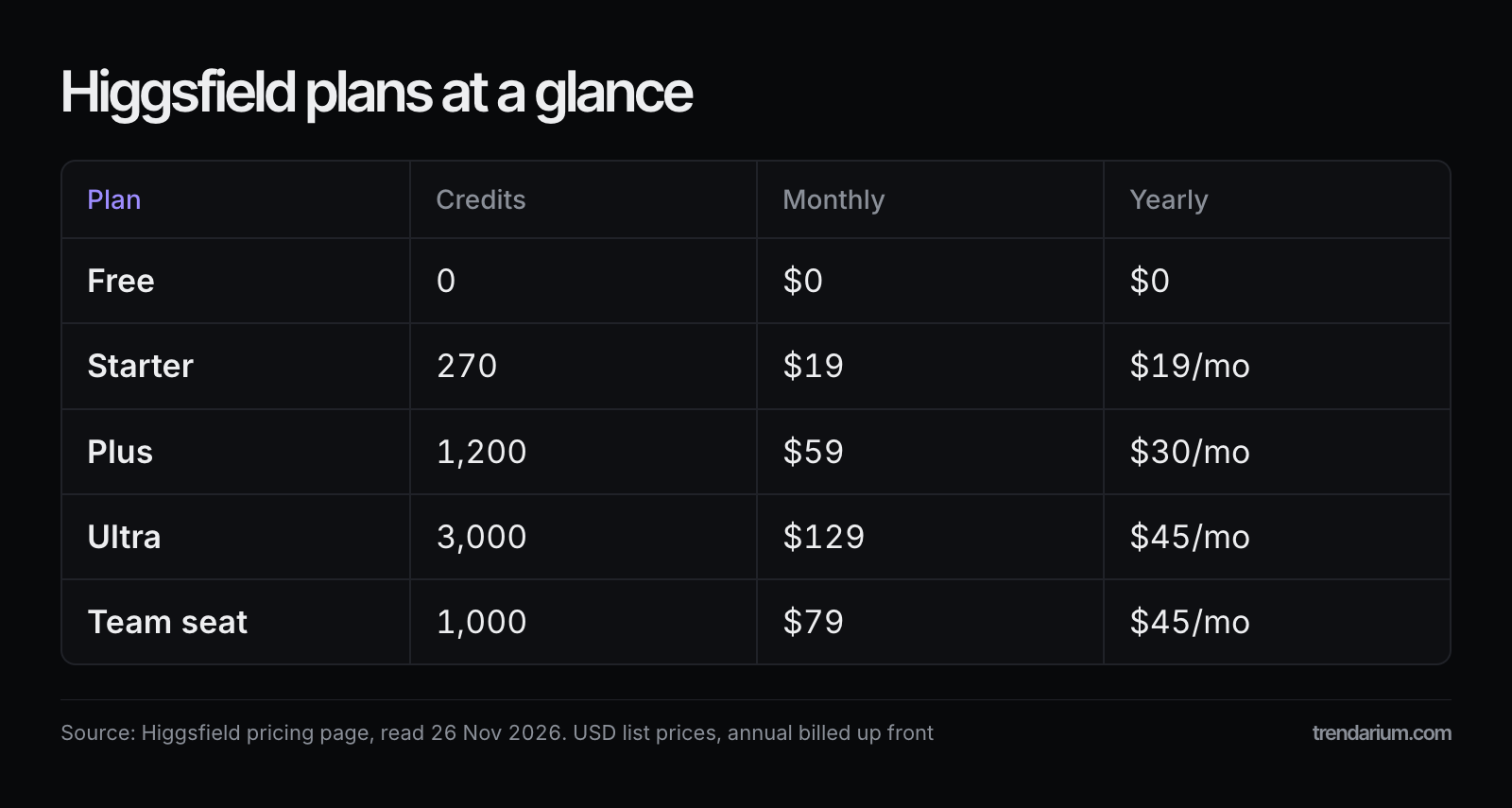
- Plans on 26 November 2026: Free $0, Starter $19 a month (270 credits), Plus $59 (1,200), Ultra from $129 (3,000). Annual billing cuts Plus to $30 a month. Black Friday pricing ends 27 November at 00:00 UTC [1].
- The Free plan has no monthly credits and can add a watermark [5].
- Its Terms name a US company. Trustpilot reviews repeat complaints about renewals and refunds, which are allegations. Renewals are not refundable. You cancel in account settings [3][4][8][14].
What Higgsfield is
Higgsfield calls itself “the generative platform for creative production” [7]. It targets agencies, e-commerce brands, marketers and studios. The homepage says it combines 35+ models with an agent for production work, and that it was founded in 2023 [7]. A blog post from September 2026 says 30+ [9]. We cannot reconcile the two numbers.
You write a prompt or add reference images, pick a model, and spend credits. The cost is shown before you start [5].
Higgsfield also has its own tools. The homepage names Genjutsu for video remixing, an Editing Room that changes angle, light and camera in existing video, and Shorts Studio [7].
The homepage claims more than 40 million users and creative teams at 430 Fortune 500 companies [7]. A press release of 17 August 2026 says Higgsfield raised $400 million in a Series B at a $5.4 billion valuation, led by DST Global, and reports $700 million in annualized revenue [13]. These are company claims, and we found no independent count. The same release says more than 30 million users, against 40 million on the homepage [13].
The homepage also promotes a Higgsfield MCP for Claude, which generates images and videos inside Claude [7]. Our Claude hub covers that assistant.
Disclosure: Trendarium uses AI assistants when drafting pages.
Plans and prices
Prices below are US dollars, from Higgsfield’s pricing page [1]. The page shows a list price and, right now, Black Friday prices.
| Plan | Credits a month | Monthly billing | Annual billing | Source |
|---|---|---|---|---|
| Free | 0 | $0 | $0 | [1][5] |
| Starter | 270 | $19 | $19 a month, billed $228 a year | [1] |
| Plus | 1,200 | $40 first month, then $59 | $30 a month, billed $360 a year (list $59) | [1] |
| Ultra | 3,000 | $75 first month, then $129 | $45 a month, billed $540 a year (list $129) | [1] |
| Ultra | 6,000 | $140 first month, then $250 | $83 a month, billed $996 a year (list $258) | [1] |
| Ultra | 9,000 | $199 first month, then $375 | $117 a month, billed $1,404 a year (list $387) | [1] |
| Team, per seat (2 to 9 seats) | 1,000 | $55 (list $79) | $45 a month, billed $539.98 a year | [1] |
| Scale, per seat (5 to 15 seats) | 2,500 | $119.99 (list $215) | $80 a month, billed $960.02 a year | [1] |
| Enterprise | Custom | Contact sales | Contact sales | [1] |
Prices read on 26 November 2026 from Higgsfield’s pricing page. Prices exclude VAT and local taxes, which are added at checkout [1].
Notes:
- Black Friday. The page says pricing is “up to 69% off” and ends on 27 November 2026 at 00:00 UTC. Expect the list prices to return after that [1].
- Plus was $49 in September. Higgsfield’s blog post of 15 September 2026 lists Plus at $49 a month and Ultra annual at $99. Its 24 October post lists Plus at $59 [2][9]. The pricing page read on 26 November shows $59, so we lead with it. Other sites may still quote $49.
- Team seats. The pricing table says 2 to 9 seats for Team. The FAQ on the same page says a minimum of 3 and up to 15. We cannot reconcile them [1].
- Regional prices. The pricing page says its prices are for US customers and that prices in other regions can differ [1]. We did not check any country.
Credits, rollover and unlimited
- No rollover. Subscription credits expire at the end of each cycle. Monthly plans refresh on the purchase date. Annual plans refresh every 30 days, though the page’s FAQ describes a monthly reset, so confirm with Higgsfield [1][3].
- Credit packs. Credit Pack and Auto-Refill credits expire 90 days after purchase. The help page says packs need an active subscription [2][3][5].
- Failed generations. The blog says they are usually refunded automatically [2].
- “Unlimited.” Paid plans include time-limited unlimited windows on some models, for example 7 days of Nano Banana Pro on annual Plus. Unlimited access uses the standard queue, works only on higgsfield.ai, and has resolution and duration caps. MCP, CLI, Canvas and Supercomputer use credits [1][9]. Recent Trustpilot reviews mention slow queues for unlimited generation [8].
What a clip costs
The costs below come from Higgsfield’s October 2026 blog post [2]. The pricing page lists no per-model costs, and Higgsfield says the cost of each generation is shown before you start [5], so confirm there.
| Model and setting | Credits | Source |
|---|---|---|
| FLUX.2 Pro, 1 image | 1 | [2] |
| Nano Banana Pro, 1 image | 2 | [2] |
| Nano Banana Pro 4K, 1 image | 4 | [2] |
| Seedance 2.0, 5 s at 720p / 1080p / 4K | 30 / 60 / 130 | [2] |
| Seedance 2.5, 5 s at 720p / 1080p | 35 / 80 | [2] |
| Seedance 2.5, 30 s at 720p | 210 | [2] |
| Google Veo 3 Fast with audio, 8 s at 720p | 22 | [2] |
| Google Veo 3 with audio, 8 s at 720p | 58 | [2] |
| Kling 3.0, 8 s at 1080p (September blog) | 20 | [9] |
The September post gives Seedance 2.5 at 72 credits for 8 seconds at 1080p [9], while the October table gives 80 credits for 5 seconds [2]. Costs seem to have changed between posts, and the October post has a typo and two text claims that do not match its own table [2].
The math, per clip
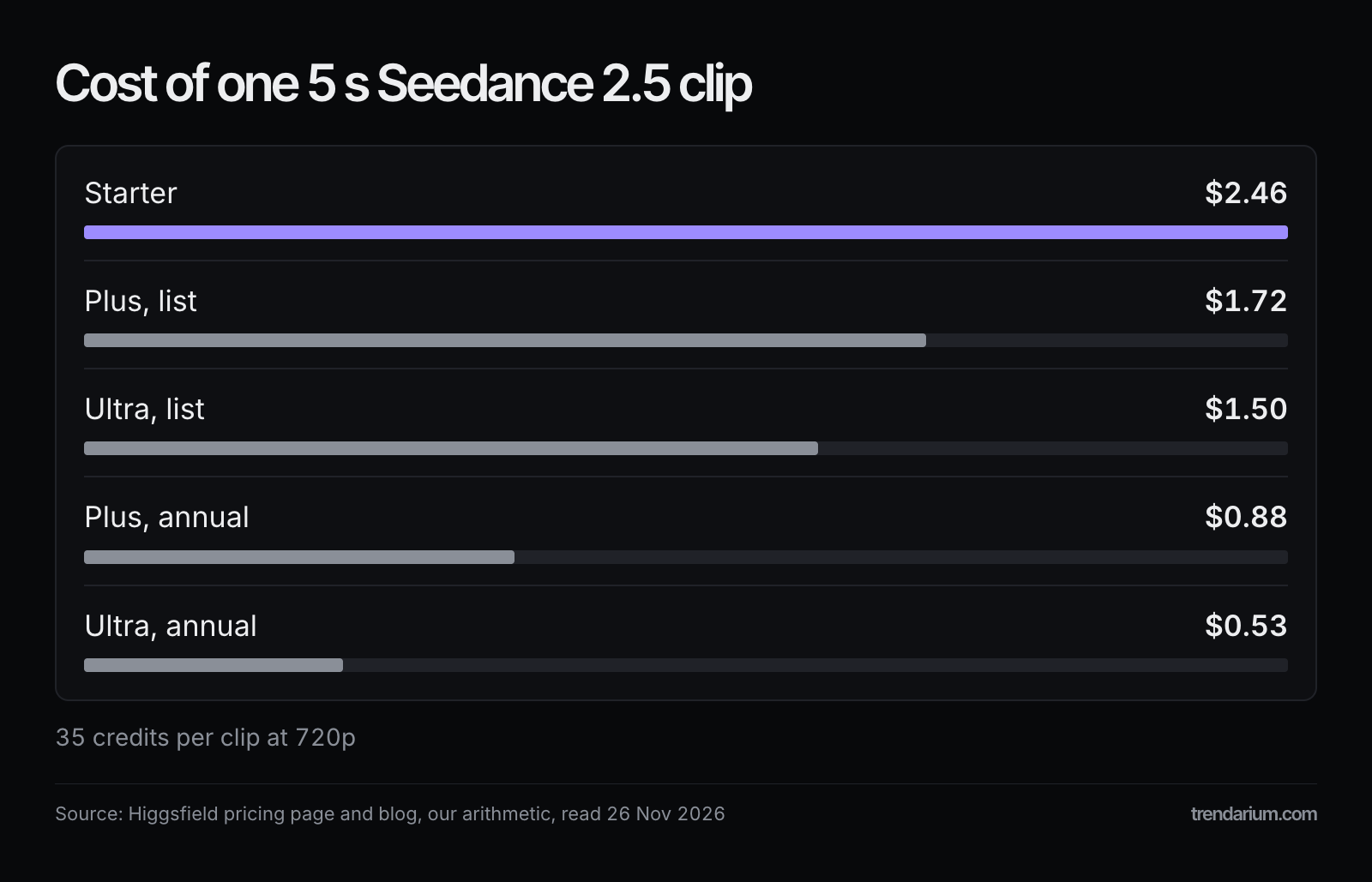
This is our arithmetic from list prices, not a test. Cost per credit is the plan price divided by its monthly credits.
| Plan | Price per credit | One Seedance 2.5 clip, 5 s at 720p (35 credits) | Clips a month |
|---|---|---|---|
| Starter, $19 | $0.070 | $2.46 | 7 |
| Plus, list $59 | $0.049 | $1.72 | 34 |
| Plus, annual $30 a month | $0.025 | $0.88 | 34 |
| Ultra 3,000, list $129 | $0.043 | $1.50 | 85 |
| Ultra 3,000, annual $45 a month | $0.015 | $0.53 | 85 |
Clips a month is the credits divided by 35, rounded down, with no failed or retried clips. Real use includes retries, so plan for fewer. Credits do not roll over, so unused ones are lost [1][3].
Which models it uses
Higgsfield’s own pages name these models [2][7][9]:
- Third-party: Kling 3.0, Google Veo 3 and 3.1, Seedance 2.0 and 2.5, Wan 2.5 and 2.6, Nano Banana, Nano Banana Pro, FLUX.2 Pro and Max, Seedream, GPT Image 2.6, and MAGI-2, which the homepage presents as a Sand.ai model exclusive to Higgsfield.
- Its own: Soul, Genjutsu, and Higgsfield Speak 2.0.
The homepage does not name Kling, Veo or Nano Banana, while the blog and pricing page do [7][9]. The pages we read do not say whether Higgsfield calls each maker’s API or runs its own copy. Per its own pages, it is a multi-model hub with some models of its own.
Can ChatGPT make video instead? Not through Sora. Our ChatGPT hub reports that OpenAI discontinued the Sora web and app experiences on 26 April 2026 [15].
Is Higgsfield legit?
Here is what the documents say, without our own verdict on quality.
The company is real. Higgsfield’s Terms of Use, updated 23 October 2026, name Higgsfield Inc. at 535 Mission St., San Francisco, California. The Terms are governed by California law and disputes go to binding arbitration, with a 30-day opt-out window [3].
Terms on outputs and data. Higgsfield says it does not claim ownership of outputs and does not restrict their commercial use. The help page says no paid plan is needed for commercial use and no attribution is required [3][6]. The same Terms let Higgsfield use inputs and outputs to train and improve its AI models. Deleting your content stops future use, but material already used for training is not removed. Enterprise customer content is not used for training. The Terms also bar using outputs to train or distill other AI models, with exceptions [3][6].
Refunds. See the next section. They are narrow [3][4].
Public reviews. On 26 November 2026 Trustpilot showed 3.9 out of 5 from 5,683 reviews, 5,426 of them in the past 12 months. The breakdown was 62% five-star and 19% one-star. Trustpilot does not verify review claims [8].
The recurring complaints in recent reviews, per Trustpilot’s page [8]:
- unexpected renewal charges for unused credits, and refunds refused under the renewals rule;
- cancellation requests that went unanswered or took several steps;
- plans and credit costs described as expensive or unclear;
- slow queues, especially for unlimited generation;
- results that missed the request.
Positive reviews praise the interface, the range of models and support [8].
What we did not find. We did not search court or regulator records. Reviews are allegations, not findings, and we make no claim of fraud or of safety. Our reading of the documents: a company with a public address and strict billing terms. We did not test the product. Read the plan period and renewal date at checkout.
Is it legal to make AI videos here?
We are not lawyers, and laws differ by country. What the Terms say [3]:
- You must be 18 or older, or the age of majority where you live.
- You need the rights to your inputs. If a photo, video or audio holds a real person’s name, likeness or voice, you need their consent.
- Unlawful, deceptive, hateful or obscene outputs, harm to minors and non-consensual intimate imagery are banned. Circumventing content filters is banned.
- You are solely responsible for how you use outputs. Higgsfield gives no warranty on their originality or legality.
Refunds and cancellation
| Situation | Rule | Source |
|---|---|---|
| First purchase, within 7 days (or longer where local law requires), no credits used from it | Refundable, minus a service fee of up to 6% | [3][4] |
| Renewal | Not refundable | [3][4] |
| Credit pack or auto-refill | Refundable within 7 days if that pack is unused | [4] |
| Offers that unlock access or features | Not refundable once access is granted | [4] |
| EU/EEA or UK consumer | 14-day withdrawal right (section 17.2): lost for digital content once supply begins; for a started service you pay for the part supplied; mandatory consumer rights preserved | [4] |
| Higgsfield degrades a paid plan or shuts a paid feature | Cancel and get the unused part back | [4] |
Using free or Unlimited-model generations does not count as using credits [4]. Approved refunds cancel the subscription at once and return money in 5 to 10 business days [4]. Request one through Higgsfield’s contact page with your account email, purchase date and amount [4].
To cancel: click your avatar, open Manage Account, then Subscription, scroll to Plan Settings, choose Manage Subscription, click Show and then Cancel Subscription. Team, Scale and Enterprise plans are cancelled by the workspace owner in Organization settings [14]. The Terms mention the Payment Setting page or email to support [3].
Subscription credits stay usable until the paid period ends and then expire. Credit packs, Auto-Refill and Boost credits stay on the free plan for their 90 days [14]. There is no prorated refund [3]. Price rises need at least 30 days’ notice for subscriptions [3].
Read 26 November 2026.
How to start
- Open higgsfield.ai and create an account. You start on Free [5].
- Check the credit cost shown before you run a model [5].
- If you pay, choose monthly or annual on purpose. Annual prices are billed as one payment [1].
- Note your renewal date. Credits expire at the end of each cycle [1][3].
- Download results before cancelling. Free-plan files keep their watermark after you upgrade [5].
What we checked
On 26 November 2026 we read Higgsfield’s pricing page in its Markdown form, its homepage, Terms of Use, help articles on the free plan, refunds and ownership, two blog posts, the cancellation help article, a press release on funding, Trustpilot’s page for Higgsfield, Kling’s credit guide and API pricing documentation, and our Google Flow hub.
We did not use Higgsfield, make an account or generate a clip. The pricing page does not state a watermark rule, commercial terms or a refund policy, so those come from the Terms and help center [1][3][4][6].
Higgsfield compared
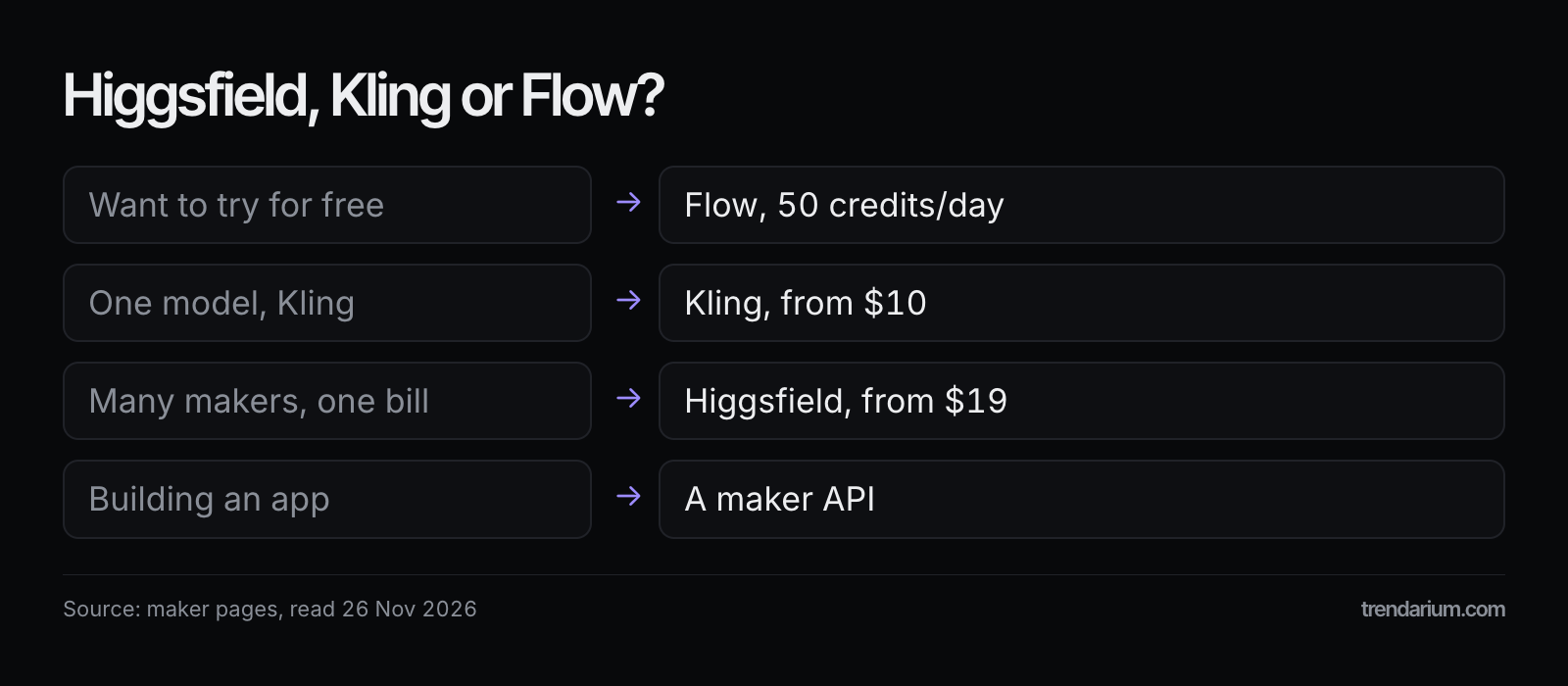
All numbers read on 26 November 2026. Kling prices are its published USD plan prices with a first-subscription discount shown separately [10]. Flow numbers are from our Google Flow hub [12].
| Higgsfield | Kling (see Kling hub) | Google Flow | |
|---|---|---|---|
| What it is | Multi-model hub, own and third-party models [7] | One maker’s models (Kling), own app and API [10] | Google’s filmmaking tool, Veo and Gemini Omni [12] |
| Free access | $0, no monthly credits, watermark [5] | $0 Basic, no monthly credits listed [10] | 50 credits a day [12] |
| Entry paid plan | Starter $19, 270 credits [1] | Standard $10 shown, $6.99 first month, 660 credits [10] | AI Plus $4.99, 200 credits [12] |
| Mid plan | Plus $59, 1,200 credits [1] | Pro $37 shown, 3,000 credits [10] | AI Pro $19.99, 1,000 credits [12] |
| Top plan | Ultra $129 to $375, 3,000 to 9,000 credits [1] | Ultra $180 shown, 26,000 credits [10] | Ultra $99.99 or $199.99, 10,000 or 25,000 credits [12] |
| Models you can pick | Many makers [7] | Kling only [10] | Google only [12] |
| Credit rollover | None [1] | Not read | None [12] |
Credit units differ across the three, so compare credits per clip, not credits per month. For one real comparison: Higgsfield lists Kling 3.0 at 20 credits for 8 seconds at 1080p [9]. Kling’s own API charges $0.168 a second for Kling 3.0 at 1080p with audio, so about $1.34 for 8 seconds [11]. Flow charges 3 credits a second for Omni Flash 1.2 at 720p [12]. We ran no quality test on any of them.
See also Midjourney for stills, Nano Banana and Google AI Studio.
Problems and fixes
| Symptom | Cause | Fix | Source |
|---|---|---|---|
| Charged for a renewal you did not want | Renewals are automatic and not refundable | Cancel before the renewal date and keep the confirmation email | [3][4] |
| Credits gone mid-cycle | No rollover | Use credits before the cycle ends, or buy a pack | [1][3] |
| “Unlimited” model still charges | Unlimited windows are time-limited, work on higgsfield.ai only, and have caps | Check the window and the model’s caps before generating | [1][9] |
| Watermark on a clip | Free plan | Regenerate on a paid plan, old files keep the mark | [5] |
What changed
- 26 Nov 2026: page published. Prices, plans and refund rules read on this date. Black Friday pricing ends 27 Nov 2026, 00:00 UTC [1].
- 24 Oct 2026: Higgsfield’s pricing blog lists Plus at $59, and the refund help page metadata shows this date [2][4].
- 23 Oct 2026: Terms of Use updated [3].
- 15 Sep 2026: an earlier blog post lists Plus at $49 [9].
FAQ
Is Higgsfield AI free?
Partly. Every account starts on a Free plan at $0 with no monthly credits, one generation at a time, a limited set of models and a visible watermark on results. Paid plans start at $19 a month for 270 credits. Higgsfield says trial offers are personalized and not on every account. Read 26 November 2026. [1][5]
Is Higgsfield AI legit?
Its Terms of Use name Higgsfield Inc., with a San Francisco address, and Trustpilot showed 3.9 out of 5 from 5,683 reviews on 26 November 2026. Reviewers’ complaints concern renewals, refunds and slow queues. Trustpilot does not verify reviews, and we checked no company register. Check the plan period at checkout. [3][8]
Can I make an AI video for free on Higgsfield?
Not reliably on Higgsfield. The Free plan has no monthly credits, and its help page gives no number of free generations, only that offers vary by account. Google Flow lists 50 free credits a day, which our Flow hub works out to two 8-second 720p clips. Check the cost shown before you generate. Read 26 November 2026. [1][5][12]
How much does Higgsfield cost per month?
Starter is $19 a month for 270 credits. Plus is $59 a month for 1,200 credits, or $30 a month billed yearly. Ultra starts at $129 a month for 3,000 credits, or $45 a month billed yearly. Teams pay per seat. Annual prices are billed as one payment. Read 26 November 2026. [1]
How do I get a refund from Higgsfield?
Refunds cover an initial purchase, requested within 7 days, with no credits used from it. Renewals are not refundable. A service fee of up to 6% is deducted. EU/EEA and UK consumers have a 14-day withdrawal right (section 17.2): it is lost for digital content once supply begins, while for a service already started you pay for the part supplied, and mandatory consumer rights stay in place. Ask through the support contact page. Read 26 November 2026. [3][4]
What models does Higgsfield use?
Its own pages list third-party models such as Kling 3.0, Veo 3.1, Seedance 2.5, Wan 2.6, Nano Banana Pro and FLUX.2 Pro, next to its own Soul and Genjutsu. The homepage claims 35+ models, a blog post says 30+. The set changes often, so check the model list in your account. [2][7][9]
Is Higgsfield better than Kling or Google Flow?
They are different products. Higgsfield is a multi-model hub that sells credits. Kling is one maker’s model line. Flow is Google’s tool, with 50 free credits a day. We ran no quality test, so we rank none of them. Compare the prices and credit math on this page. Read 26 November 2026. [1][10][12]
Can I use Higgsfield videos commercially?
Higgsfield’s Terms say it does not claim ownership of outputs and does not restrict their commercial use, and the help page says no plan is needed for that. Outputs may not be unique. Watermarks appear on free-plan results. Third-party model rules are not described on the pages we read. [3][6]
Does Higgsfield replace CapCut?
We found no source that says so. Higgsfield describes itself as a generative platform for video, images and audio, with an Editing Room and a Shorts Studio. CapCut is an editor. We did not use either, so we make no claim about replacing one with the other. [7]
How do I cancel Higgsfield?
Click your avatar, open Manage Account, then Subscription, then Plan Settings, and choose Manage Subscription, Show, Cancel Subscription. Access stays until the paid period ends, then subscription credits expire. Team, Scale and Enterprise plans are cancelled by the workspace owner. Renewals are not refundable, so cancel before the renewal date. Read 26 November 2026. [4][14]
Sources
- Higgsfield, Pricing, https://higgsfield.ai/pricing, read 26 Nov 2026.
- Higgsfield, Higgsfield pricing explained (blog, 24 Oct 2026), https://higgsfield.ai/blog/higgsfield-pricing-explained, read 26 Nov 2026.
- Higgsfield, Terms of Use (updated 23 Oct 2026), https://higgsfield.ai/terms, read 26 Nov 2026.
- Higgsfield Help Center, How do I request a refund?, https://higgsfield.ai/creator-hub/help-center/refunds-and-cancellations/how-do-i-request-a-refund, read 26 Nov 2026.
- Higgsfield Help Center, What does the free plan include?, https://higgsfield.ai/creator-hub/help-center/plans/what-does-the-free-plan-include, read 26 Nov 2026.
- Higgsfield Help Center, Who owns my generations and can I use them commercially?, https://higgsfield.ai/creator-hub/help-center/account-and-privacy/who-owns-my-generations-and-can-i-use-them-commercially, read 26 Nov 2026.
- Higgsfield, Homepage, https://higgsfield.ai/, read 26 Nov 2026.
- Trustpilot, Higgsfield AI reviews, https://www.trustpilot.com/review/higgsfield.ai, read 26 Nov 2026.
- Higgsfield, Credits vs unlimited AI video generation (blog, 15 Sep 2026), https://higgsfield.ai/blog/credits-vs-unlimited-ai-video-generation, read 26 Nov 2026.
- Kling AI, Kling AI credit planning: 4K video and multi-shot budget guide (blog, 28 Jul 2026), https://kling.ai/blog/kling-video-3-0-credit-cost-guide, read 26 Nov 2026.
- Kling AI, API pricing: video (documentation), https://kling.ai/document-api/pricing/base/video.md, read 26 Nov 2026.
- Trendarium, Google Flow hub (reads Google’s Flow help and plans pages), https://trendarium.com/google-flow/, read 26 Nov 2026.
- PR Newswire, Higgsfield raises $400 million Series B (press release, 17 Aug 2026), https://www.prnewswire.com/news-releases/higgsfield-raises-400-million-series-b-financing-at-5-4-billion-valuation-with-annualized-revenue-reaching-700-million-302852430.html, read 26 Nov 2026.
- Higgsfield Help Center, How do I cancel my subscription?, https://higgsfield.ai/creator-hub/help-center/refunds-and-cancellations/how-do-i-cancel-my-subscription, read 26 Nov 2026.
- Trendarium, ChatGPT hub (reads OpenAI’s Sora discontinuation help article), https://trendarium.com/chatgpt/, read 26 Nov 2026.
Read next
- Kling AI: free tier, credit math and model versions of Kuaishou’s video model.
- Google Flow: Google’s video tool with 50 free credits a day.
- Midjourney: the image side, plans and limits.
- Nano Banana: Google’s image model that Higgsfield also lists.
- Claude and ChatGPT: text assistants for writing the prompts.
- Qwen: Alibaba’s model family, including open weights.
Written by
Mike
Mike is the founder and editor of Trendarium. He writes about AI tools, games and consumer tech. Drafts are prepared with AI assistance; every price, date and claim is checked against the official source linked on the page, and each page shows when it was last updated.
Related hubs



Most read
- Amazon Prime Day and Prime Big Deal Days: every date Amazon published, and what is known about 2027
- Qwen: what it is, free vs paid, API prices, running it locally and data safety
- GeForce RTX 5080: price, specs and how it compares with the 4090 and 5090
- Squid Game: is there a season 4, where to watch, spin-offs and age rating
- The Pitt: season 3 date, episode guide, cast and where to watch
Latest
Nothing new in the last hour.
Nothing new in the last 24 h. Most recent:
- Qwen: what it is, free vs paid, API prices, running it locally and data safety
- GeForce RTX 5080: price, specs and how it compares with the 4090 and 5090
- Squid Game: is there a season 4, where to watch, spin-offs and age rating
- The Pitt: season 3 date, episode guide, cast and where to watch
- Wednesday (Netflix): seasons, episodes, cast and where season 3 stands