 By Mike. Published: . Last updated: .
Drafted with AI assistance. Every price, date and claim was checked against the linked sources on the date shown.
In short
- Google Flow is Google Labs’ AI filmmaking studio for clips, scenes and stories, launched on 20 May 2025. It runs on Veo, Gemini Omni and Nano Banana models [2][12].
- Everyone gets 50 credits a day. Plus, Pro and Ultra add 200, 1,000, 10,000 or 25,000 a month on top [1].
- A 720p clip on Omni Flash 1.2 costs 3 credits per second. Veo 3.1 Lite costs 10 credits per clip [1].
- Flow is listed for 167 countries and territories, Poland included, for ages 18 and over [3].
Prices and credits read on 26 November 2026.

What Google Flow is
Flow turns a text prompt or reference media into video clips, images and scenes that you arrange into a story [2][6]. Google introduced it on 20 May 2025 as the successor to the Labs experiment VideoFX. At launch it was US only and limited to Google AI Pro and Ultra subscribers [12].
Today there are four ways to make a video [13]:
- a plain text prompt in the prompt box;
- start and end frames, where Flow fills in the action between two images;
- “ingredients”, reference images that you call by name with @;
- the Agent switch, which plans the scene and can make several variations at once.
You can also reuse a character by typing @ and its name, and the Omni Flash model accepts voice references [13]. On 19 May 2026 Google Labs added Flow Agent, which helps brainstorm, batch edit and organize assets, and Flow Tools, which build a custom workflow from a plain-language description [6]. Flow Music, for songs, is a separate Labs app in the same family [14].
Flow is not the Gemini chat app. It has its own site, flow.google.com, and its own credit balance. Both are paid for through one Google AI subscription, covered in our Gemini guide [4].
Plans and credits
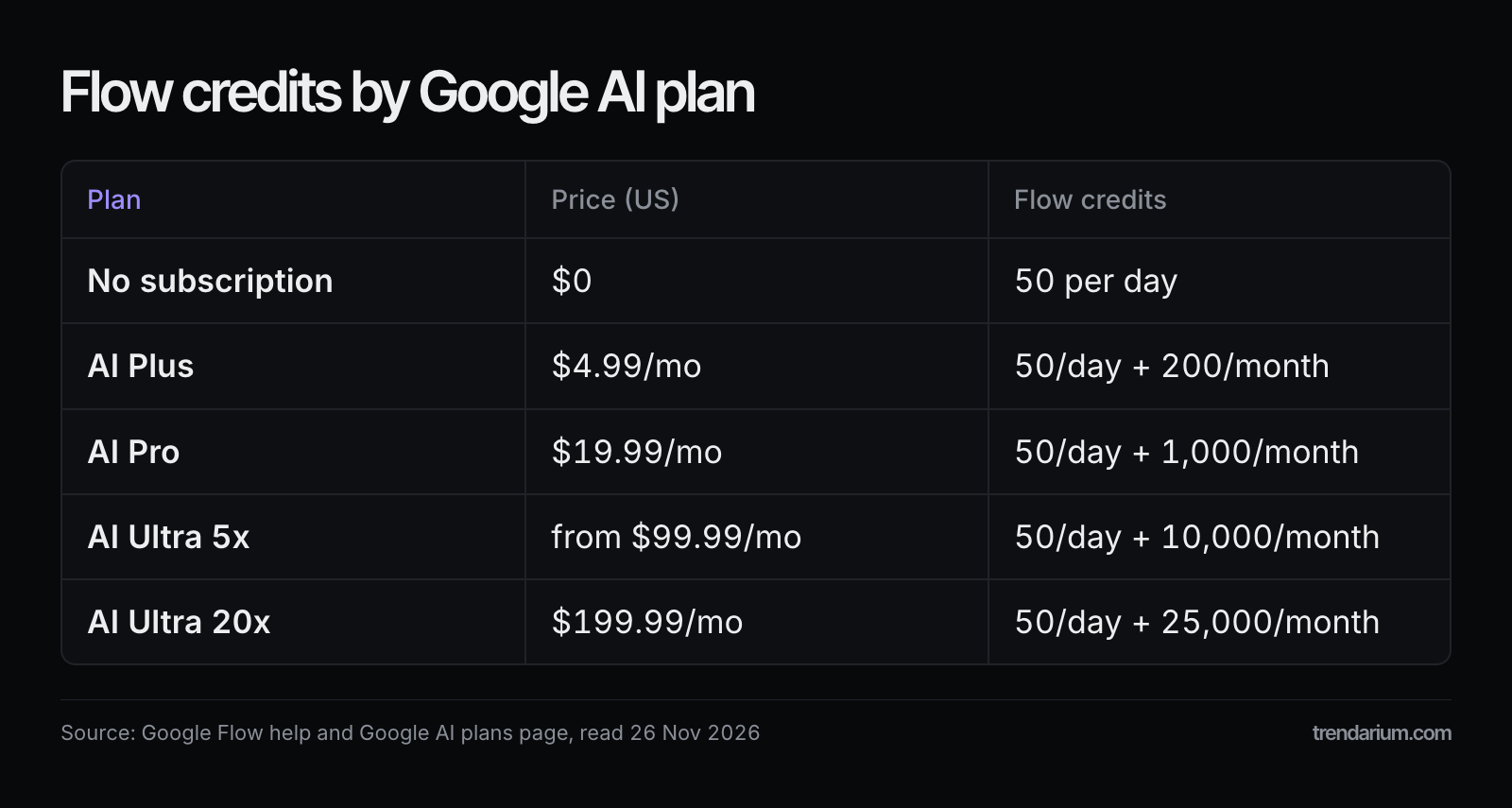
Flow credits come with your Google AI plan. The credit allowances are from Flow’s help page, which says everyone gets 50 credits a day, with or without a subscription, and subscribers get monthly credits on top [1]. The monthly prices are from Google’s US plans page, which shows dollar amounts [4].
| Plan | Monthly price (US) | Flow credits | Source |
|---|---|---|---|
| No subscription | $0 | 50 per day, no monthly allowance | [1][4] |
| Google AI Plus | $4.99 | 50 per day + 200 per month | [1][4] |
| Google AI Pro | $19.99 | 50 per day + 1,000 per month | [1][4] |
| Google AI Ultra, 5x tier | From $99.99 | 50 per day + 10,000 per month | [1][4][5] |
| Google AI Ultra, 20x tier | $199.99 | 50 per day + 25,000 per month | [1][4][5] |
Prices and credits read on 26 November 2026 from Google’s help and plans pages. Taxes may apply, and prices vary by country. In Poland the same plans cost 23.99 zł (Plus), 97.99 zł (Pro), and 469.99 zł or 979.99 zł (Ultra), per Google’s Polish plans page read the same day [15]. Google’s US plans page lists “10,000 or 25,000” Flow credits for Ultra without saying which tier gets which. Google’s Dutch plans page lists 10,000 for Ultra 5x and 25,000 for Ultra 20x, and Flow’s help page ties 10,000 to the $100 tier and 25,000 to the $200 tier [1][4][5].
Notes:
- Free credits. They refresh after your first generation of the day and do not roll over. Google adds that videos may be unavailable for free users at peak times, about 2 to 5 PM UTC, while images and the Flow Agent still work [1].
- Images and the Agent. Flow’s credits page lists no credit cost for either and says non-subscribers can use both. It points to the Settings icon in the prompt box for current costs [1].
- Monthly credits. They refresh at the start of your billing cycle and do not roll over [1].
- Top-ups. Plus, Pro and Ultra subscribers can buy AI credits in supported regions, except Japan. On a family plan only the plan manager can buy them [1][3].
- Workspace. Users on certain qualifying Workspace plans get Flow at no extra charge, with 50 daily credits [2].
- Ultra history. In August 2025 Google doubled Ultra’s monthly credits from 12,500 to 25,000 [9]. The older allowance no longer matches the help page.
What a clip costs
Flow charges credits per generation. The table shows the rows for current models on Flow’s help page [1].
| Model and action | Credits | Who |
|---|---|---|
| Omni Flash 1.2, video up to 10 s, 360p | 1 per second | All users |
| Omni Flash 1.2, video up to 10 s, 720p | 3 per second | All users |
| Omni Flash 1.2, seconds 11 to 15, 360p / 720p | 2 / 6 per extra second | Subscribers |
| Omni Flash 1.2, extend a video, 360p / 720p | 1 / 3 per second added | Subscribers |
| Omni Flash 1.2, upscale to 720p or 1080p, 1 to 10 s | 0 | Subscribers |
| Omni Flash 1.2, upscale to 4K, 1 to 10 s | 50 flat | Ultra |
| Veo 3.1 Lite, 4, 6 or 8 s at 720p | 10, or 5 on Ultra | All users |
| Veo 3.1 Fast, 4, 6 or 8 s (retires 5 Dec 2026) | 20, or 10 on Ultra | Non-Ultra / Ultra |
| Veo 3.1 Quality, 8 s (retires 5 Dec 2026) | 100 | All users |
Read on 26 November 2026. Google says limits and costs can change and points to the Settings icon in the prompt box for current numbers [1]. Veo 3.1 Lite in Lower Priority mode costs 0 credits, but only for Ultra 20x and family plan managers [1].
Credit math for one clip
This is arithmetic from the table, not a measured result.
- Omni Flash 1.2, 8 seconds, 720p: 8 x 3 = 24 credits.
- Veo 3.1 Lite, 8 seconds, 720p: 10 credits (5 on Ultra).
- On the free 50 credits a day, that is two Omni clips (48 credits) or five Veo 3.1 Lite clips (50 credits) per day.
Veo and Omni: which model is which
Flow’s help page names three model families: Veo, Omni and Nano Banana. It says all outputs carry an invisible SynthID watermark [2].
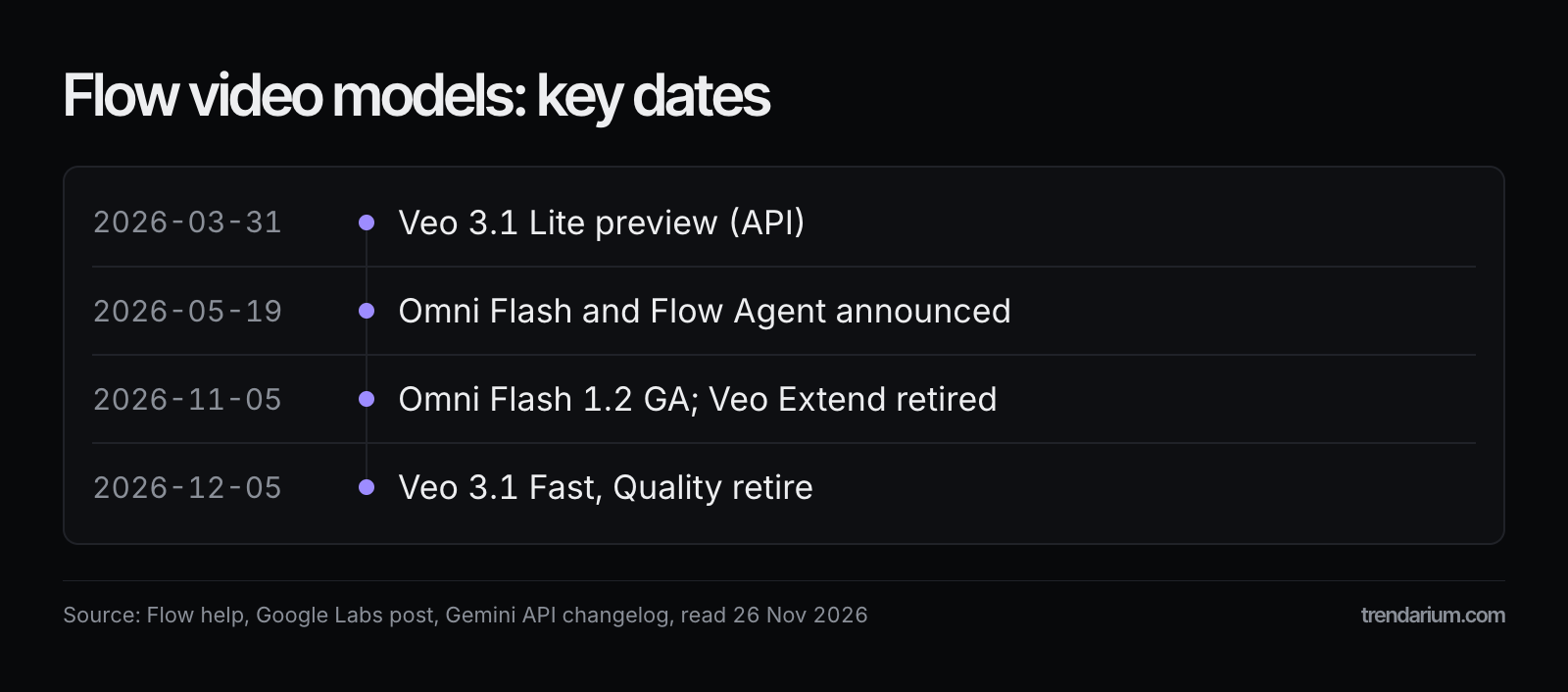
- Gemini Omni Flash 1.2 is the newest video model. Google’s developer changelog lists Omni 1.2 Flash as generally available on 5 November 2026, and the Flow cost table is built around it. Clips can run to 15 seconds [1][7].
- Veo 3.1 Lite stays on the cost table. Google listed it as a preview on the developer side on 31 March 2026 [1][7].
- Veo 3.1 Fast and Veo 3.1 Quality are scheduled to retire on 5 December 2026, together with Omni Flash 1.1. Veo Extend was retired on 5 November 2026; Google tells users to extend clips with Omni Flash 1.2 [1].
- Plans page. Google’s US plans page lists Veo 3.1 under Ultra and a limited trial of Veo 3.1 Lite under Pro. It does not mention Veo 3.1 Fast or Quality [4].
Our reading: the main Flow video model moved from Veo to Omni in 2026, and Veo 3.1 Lite is the cheap option that stays. This is our reading of the pages, not a Google statement.
How to start
- Open flow.google.com in a Chromium browser such as Chrome or Edge, or install the app, and sign in with a Google account. You must be 18 or older and your age must be verified [2].
- Check that your country is on the supported list [3].
- Write a prompt, or add a reference image or clip. Google recommends English prompts for best results [3].
- Open the Settings icon in the prompt box to see what each generation costs before you run it [1].
- If you want more than 50 credits a day, upgrade your Google AI plan; monthly credits come on top of the daily 50. On a family plan, only the plan manager can buy extra credits [1].
Availability
| Item | Status on 26 Nov 2026 | Source |
|---|---|---|
| Countries and territories | 167 listed, including Poland, all 27 EU states, the US, UK, India, Canada and Japan | [3] |
| Age | 18 and over, age verified | [2][3] |
| Languages | 86 listed, English prompts recommended | [3] |
| EEA, Switzerland, United Kingdom | No editing of uploaded videos, no Avatars | [3] |
| Japan | Flow works, but AI credits are unavailable | [3] |
| Visible watermark | Added automatically in India, South Korea and Vietnam, unless on Ultra 20x | [2] |
| iPhone app | Free on the App Store with in-app purchases, iOS 16 or later, rated 18+, version 1.621.0 dated 16 Nov | [11] |
| Android app | The help page tells you to download the Flow app; the 19 May 2026 post called the Android app a beta | [2][6] |
140 or 167 countries. Google’s Dutch plans page says Veo 3.1, Flow and Flow Music are available in “meer dan 140 landen en gebieden” (more than 140 countries and territories), and the 19 May 2026 Labs post says Flow “launched in over 140 countries” [5][6]. The US plans page gives no country count for Flow. Flow’s help page lists 167 [3]. None of the three pages dates its number. Since 167 is more than 140, they do not strictly conflict. We use 167 because it is a named list that includes Poland.
What we checked
On 26 November 2026 we read Google’s Flow help pages on credits, getting started, creating videos and supported regions, two Google AI plans pages and the Polish one, the 20 May 2025 and 19 May 2026 Google blog posts, the Gemini API changelog and pricing page, the Gemini image help page, Google Labs and the App Store listing. Google’s help pages carry no update date, only a 2026 copyright line.
The Google Play listing did not load for us, so the Android app status rests on the help page and the May 2026 post, which called it a beta. Credit math in this guide is arithmetic from Google’s table.
One conflict: Google’s 19 May 2026 post said Omni Flash in Flow was for Google AI subscribers, while the credits page now lists Omni Flash 1.2 for “all users” up to 10 seconds. We follow the credits page, which is newer, but a free account may see different options [1][6].
Flow compared
| Flow | Gemini app | Gemini API and AI Studio | |
|---|---|---|---|
| What it is | Video, image and music workspace | Chat assistant | Developer access to models |
| Free access | 50 credits a day | Free plan, with limited Flow access and Nano Banana Pro [4] | Omni 1.2 Flash not on the free tier [8] |
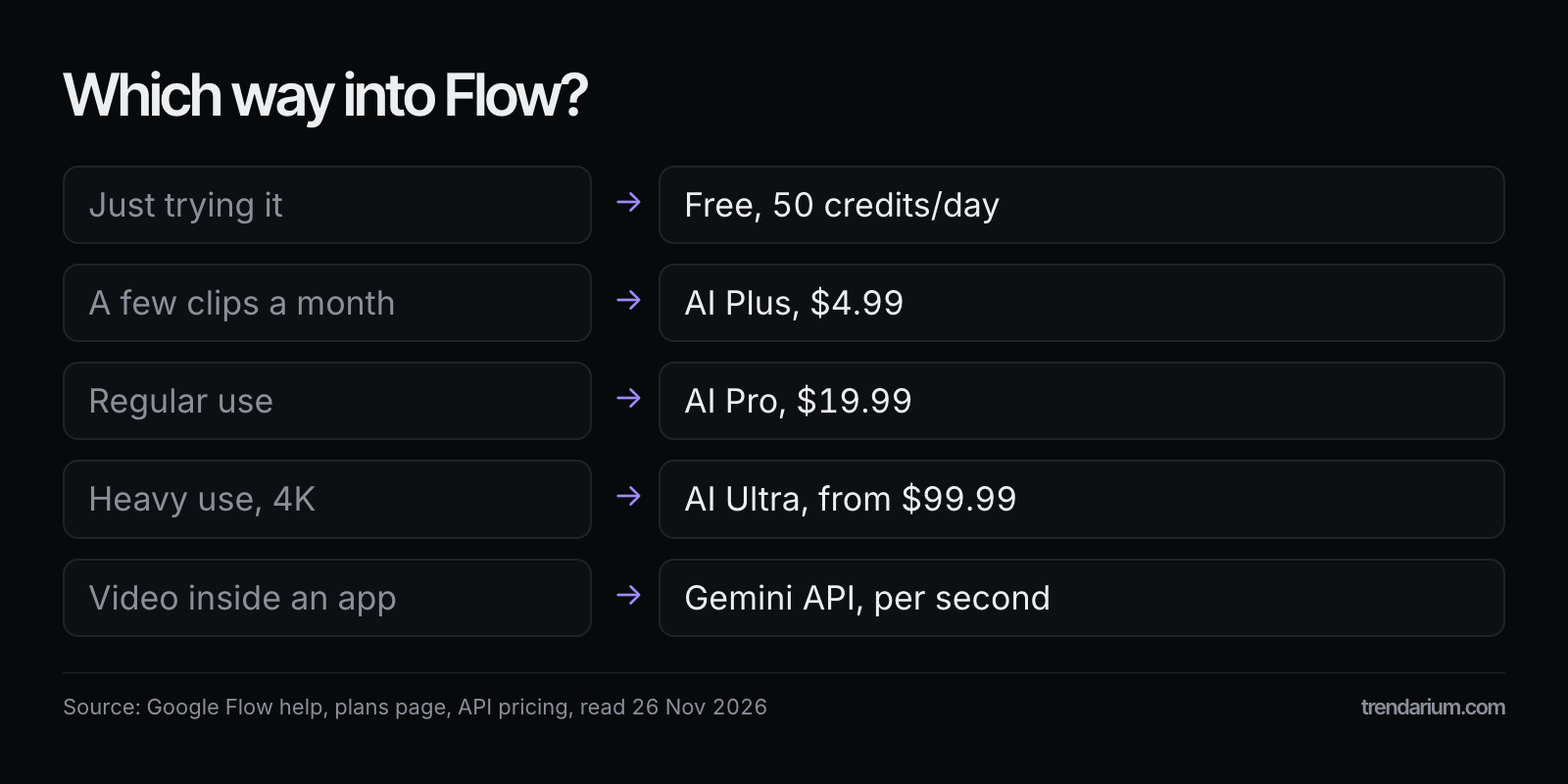
| Video price | Credits per second, from the table | Needs a Google AI plan for Omni features such as GIFs [10] | About $0.07 per second at 720p for Omni 1.2 Flash [8] |
| Best for | Making and editing clips and scenes | Quick questions, images, short GIFs | Building video into an app |
Related Google tools: Google AI Studio for the developer side, Nano Banana for images, NotebookLM for source-based notes and Google AI Mode in Search. For a rival in images see Midjourney, and for music see Suno. Our Claude hub covers a text assistant that makes no video.
Problems and fixes
| Symptom | Cause | Fix | Source |
|---|---|---|---|
| Video button unavailable | Peak demand, about 2 to 5 PM UTC, affects free videos | Try images, or retry later | [1] |
| Out of credits mid-month | Monthly credits do not roll over | Wait for the next billing cycle or buy AI credits | [1] |
| Cannot buy AI credits | Japan, or you are not the family plan manager | Ask the plan manager; Japan is not supported | [1][3] |
| Cannot edit an uploaded video | EEA, Swiss and UK users do not get that feature | Generate new clips instead | [3] |
| Veo Extend is gone | Retired on 5 Nov 2026 | Extend with Omni Flash 1.2 on a paid plan | [1] |
| Veo 3.1 Fast option disappears after 5 Dec | Model retires | Use Veo 3.1 Lite or Omni Flash 1.2 | [1] |
| Clip has a visible watermark | India, South Korea or Vietnam, not on Ultra 20x | Upgrade to Ultra 20x | [2] |
What changed
- 26 Nov 2026: page published. Credits, costs, countries and model dates read on this date.
- 5 Nov 2026: Omni Flash 1.2 became generally available on the API; Veo Extend retired in Flow [1][7].
- 5 Dec 2026 (scheduled): Veo 3.1 Fast, Veo 3.1 Quality and Omni Flash 1.1 retire [1].
- 19 May 2026: Flow Agent, Flow Tools and Omni Flash announced [6].
- 18 Aug 2025: Ultra credits doubled to 25,000 a month [9].
- 20 May 2025: Flow launched, US only, for Google AI Pro and Ultra subscribers [12].
FAQ
Is Google Flow free?
Partly. Google’s help page says people without a Google AI Plus, Pro or Ultra plan get 50 Flow credits a day. On Omni Flash 1.2 that covers two 8-second 720p clips at 24 credits each, by simple arithmetic. Some features need a paid plan. Credit costs for images are not listed. Read 26 November 2026. [1][2]
How much does Google Flow cost?
Flow has no price of its own. You get 50 credits a day free, with or without a subscription. Google AI Plus is $4.99 a month for 200 more credits a month, AI Pro $19.99 for 1,000, and AI Ultra $99.99 or $199.99 for 10,000 or 25,000. In Poland the same plans cost 23.99 zł, 97.99 zł, 469.99 zł and 979.99 zł. Read 26 November 2026. [1][4][15]
How many credits does a Google Flow video cost?
On Omni Flash 1.2, a clip up to 10 seconds costs 1 credit per second at 360p or 3 credits per second at 720p. Veo 3.1 Lite costs 10 credits for a 4, 6 or 8-second 720p clip, or 5 on Ultra. Google says costs can change. Read 26 November 2026. [1]
Which Veo version does Flow use?
Flow’s own help page lists Veo 3.1 Lite, Veo 3.1 Fast and Veo 3.1 Quality, plus Gemini Omni Flash 1.2. Veo 3.1 Fast, Veo 3.1 Quality and Omni Flash 1.1 are scheduled to retire on 5 December 2026. Veo 3.1 Lite and Omni Flash 1.2 are not listed for retirement. [1]
Is Google Flow available in Poland?
Yes. Poland is on Google’s list of 167 countries and territories where Flow is available to users aged 18 and over. The page gives no update date. Users in the EEA, Switzerland and the UK cannot edit uploaded videos or use Avatars, per the same page. Read 26 November 2026. [3]
In how many countries does Google Flow work?
Google’s help page lists 167 countries and territories. Google’s Dutch plans page and a May 2026 Google Labs post say more than 140. Both can be true, since 167 is more than 140, and Google does not date either figure. We use 167 because it is a named list. Read 26 November 2026. [3][5][6]
What is the difference between Gemini and Flow?
Gemini is Google’s assistant app. Flow is a separate filmmaking workspace for clips, scenes and stories with its own site and credit balance. They share one subscription: Google AI plans include a monthly Flow credit allowance. Gemini can also make images and short GIFs, but Flow is where Google puts its video tools. [4][10]
How do I install Google Flow?
Flow runs in a browser at flow.google.com, and Google recommends a Chromium browser on a desktop. Apple’s App Store lists a free Google Flow app for iPhone, and the help page points to an Android app. We found no Windows installer on Google’s pages. Read 26 November 2026. [2][11]
Is Google Video still available?
Google’s video tools now sit in Flow, the Gemini API and the Gemini app. Flow still offers Veo 3.1 Lite, and its newest video model is Gemini Omni 1.2 Flash, released on 5 November 2026. Veo Extend was retired on 5 November 2026, per Flow’s help page. [1][7]
Do Google Flow credits expire?
Monthly plan credits refresh at the start of your billing cycle, and unused ones do not roll over. Daily free credits do not roll over either. Credits you buy as AI credits may expire under the terms shown at purchase. Read 26 November 2026. [1]
Disclosure: Trendarium uses AI assistants when drafting pages.
Sources
- Google Flow Help, Manage your Google Flow credits, https://support.google.com/flow/answer/16526234, read 26 Nov 2026
- Google Flow Help, Get started with Google Flow, https://support.google.com/flow/answer/16353333, read 26 Nov 2026
- Google Flow Help, Where you can use Flow, https://support.google.com/flow/answer/16353544, read 26 Nov 2026
- Google, Google AI plans (Gemini subscriptions, US page), https://gemini.google/subscriptions/?hl=en, read 26 Nov 2026
- Google One, Google AI plans (Dutch page), https://one.google.com/about/google-ai-plans/, read 26 Nov 2026
- Google Blog, New agents, mobile apps and Gemini Omni for Google Flow and Google Flow Music (19 May 2026), https://blog.google/innovation-and-ai/models-and-research/google-labs/flow-updates, read 26 Nov 2026
- Google, Gemini API changelog, https://aistudio.google.com/docs/changelog, read 26 Nov 2026
- Google, Gemini API pricing, https://aistudio.google.com/docs/pricing, read 26 Nov 2026
- Google Blog, Flow and Whisk AI credits update (18 Aug 2025), https://blog.google/technology/google-labs/flow-whisk-ai-credits-update/, read 26 Nov 2026
- Gemini Apps Help, Create images with Gemini, https://support.google.com/gemini/answer/14286560, read 26 Nov 2026
- Apple App Store, Google Flow (iPhone app listing), https://apps.apple.com/us/app/google-flow/id6751294549, read 26 Nov 2026
- Google Blog, Flow: AI filmmaking tool (20 May 2025), https://blog.google/technology/ai/google-flow-veo-ai-filmmaking-tool/, read 26 Nov 2026
- Google Flow Help, Create videos in Google Flow, https://support.google.com/flow/answer/16353334, read 26 Nov 2026
- Google Labs, Google Labs home page, https://labs.google/, read 26 Nov 2026
- Google, Gemini plans, Polish page (zł prices), https://gemini.google/pl/subscriptions/?hl=pl, read 26 Nov 2026
Read next
- Gemini: plans, prices and limits: the subscription that carries your Flow credits.
- Nano Banana: Google’s image models, names and prices.
- Google AI Studio: the developer side of Google’s models.
- NotebookLM: Google’s source-based notes tool.
- Midjourney: a main rival for AI images.
Written by
Mike
Mike is the founder and editor of Trendarium. He writes about AI tools, games and consumer tech. Drafts are prepared with AI assistance; every price, date and claim is checked against the official source linked on the page, and each page shows when it was last updated.
Related hubs



Most read
- Nintendo Switch 2 games: key titles by genre, prices, scores and what is next
- GTA 6 Online: what Rockstar and Take-Two have said, and what is rumor
- Midjourney: plans, GPU hours, free trial status and image rights
- Nano Banana: model names, where it is free, price per image and unofficial sites
- PlayStation Plus: prices in the US and Poland, monthly games, and what happens if you cancel