 By Mike. Published: . Last updated: .
Drafted with AI assistance. Every price, date and claim was checked against the linked sources on the date shown.
In short
- Nano Banana is Google’s family of Gemini image generation and editing models. The latest, Nano Banana 2.1, has been generally available on the API since 6 October 2026 [2][3].
- In the Gemini app, Google marks Nano Banana 2 as free and Nano Banana 2.1 as part of a Google AI plan [4].
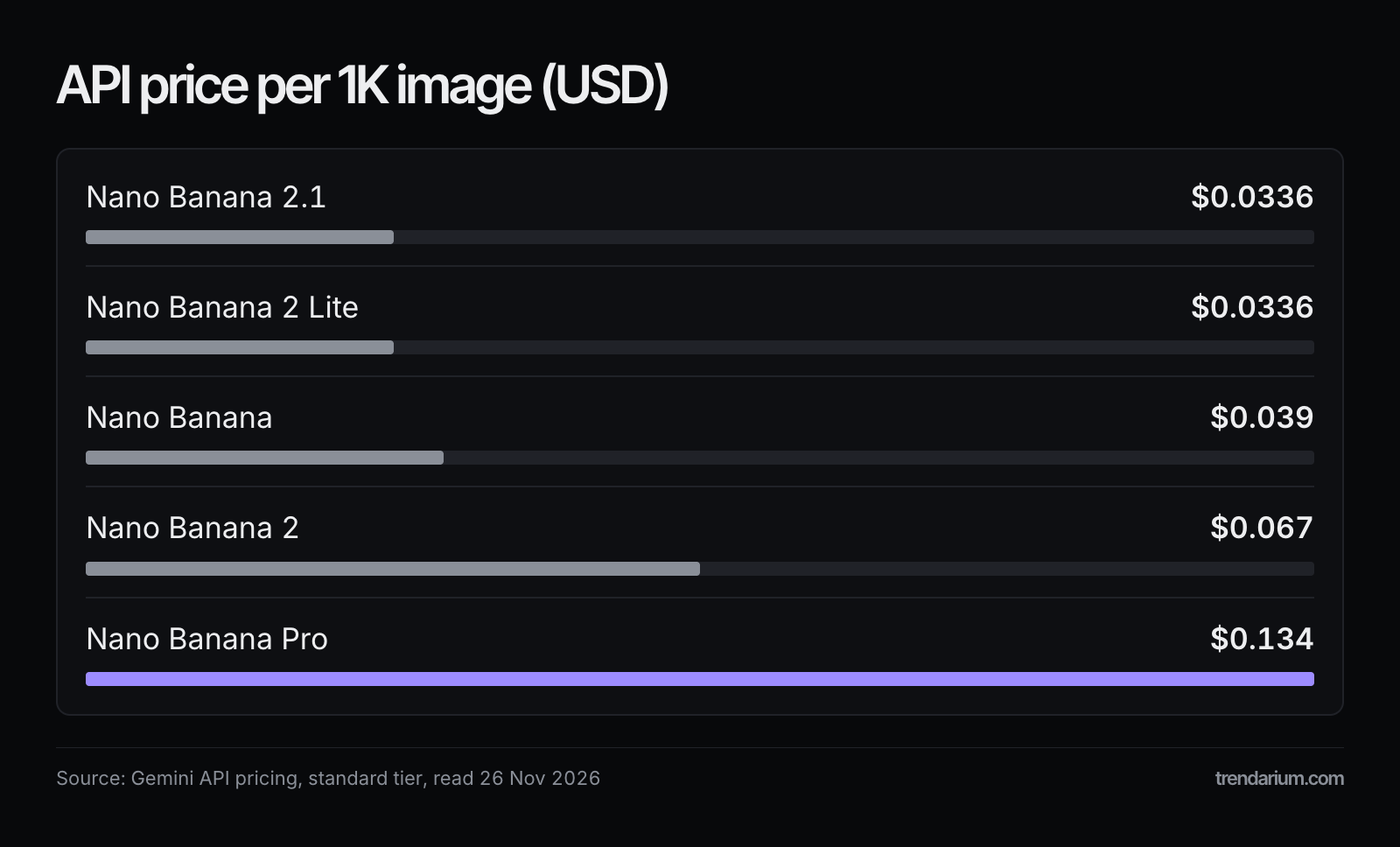
- API price per 1K image: $0.0336 (2.1 and 2 Lite), $0.067 (2), $0.134 (Pro), $0.039 (original) [1].
- Several top search results for “nano banana” are not Google’s. Use gemini.google, aistudio.google.com or deepmind.google.
Prices read on 26 November 2026.

What Nano Banana is
Nano Banana started as a nickname and became the product name. Google DeepMind now uses it for its image models built on Gemini, which make an image from text or edit an uploaded one through conversation [3].
You can use the models in the Gemini app, Google Pics, Google AI Studio and the Gemini API. Google’s Flow video tool also offers Nano Banana, and Google’s plans page promotes Nano Banana 2 for images in Gemini and Flow [8][9].
Nano Banana 2.1 is described by Google’s changelog as an update to Nano Banana 2. It keeps Flash-level speed and cost while improving visual quality, prompt adherence, character consistency across turns, text rendering and wide and panoramic aspect ratios (1:4, 4:1, 1:8 and 8:1) at 1K, 2K and 4K [2].
The phrase has a second meaning: Google’s search results also show miniature banana plants. This page is only about the AI models.
Model names as Google writes them
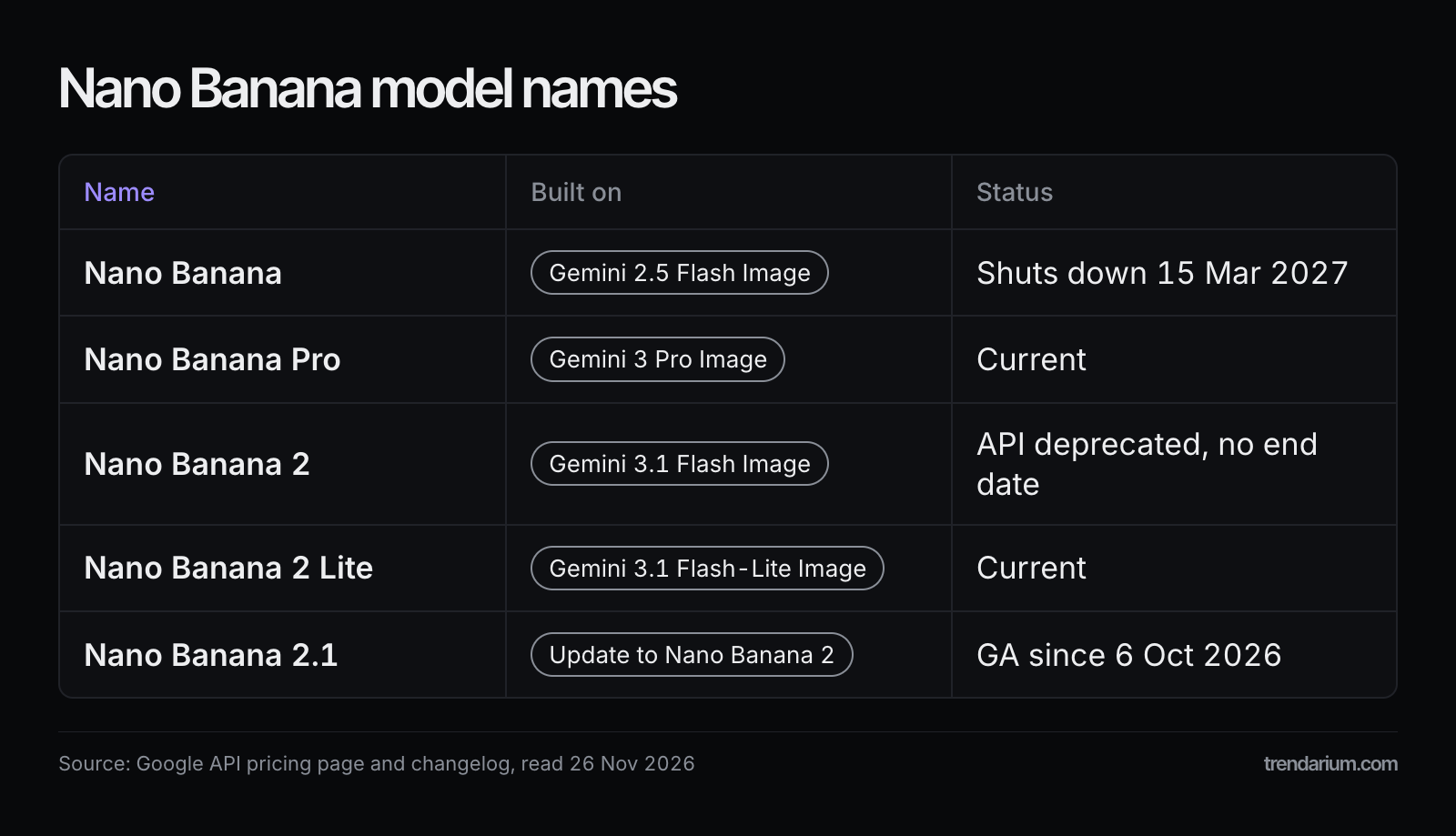
Google uses several names, and its pages do not agree on the list. This table joins the pricing page, the models page, the changelog and the DeepMind page [1][2][3][12].
| Name | Technical name | API model ID | Status on 26 Nov 2026 |
|---|---|---|---|
| Nano Banana | Gemini 2.5 Flash Image | gemini-2.5-flash-image |
Shuts down 15 March 2027; Google points to 2 Lite |
| Nano Banana Pro | Gemini 3 Pro Image | gemini-3-pro-image |
Current; generally available 28 May 2026 |
| Nano Banana 2 | Gemini 3.1 Flash Image | gemini-3.1-flash-image |
API ID deprecated on 6 Oct 2026, no shutdown date; the free Gemini app model |
| Nano Banana 2 Lite | Gemini 3.1 Flash-Lite Image | gemini-3.1-flash-lite-image |
Current; generally available 30 June 2026 |
| Nano Banana 2.1 | Update to Nano Banana 2 | gemini-nano-banana-2.1 |
Generally available since 6 Oct 2026 |
Read on 26 November 2026. The shutdown date and the model IDs are from Google’s API pricing page. The 6 October deprecation notice, the 28 May and 30 June dates and the 2.1 relationship are from the API changelog [1][2].
Where the pages disagree.
- The DeepMind page lists only Pro, 2 and 2 Lite. It names neither 2.1 nor the original [3].
- The changelog says
gemini-3.1-flash-imageis deprecated and tells developers to move togemini-nano-banana-2.1. The models page still labels Nano Banana 2 “Stable” and 2.1 “New”, and the pricing page lists no deprecation for 2 [1][2][12]. - A Gemini help page calls the Flash-Lite setting “Nano Banana Lite” and says Nano Banana 2 is used when the model is set to Flash or Pro [5].
The changelog entry is dated 6 October 2026. The models page and the pricing page carry no date; we read both on 26 November 2026 and the models page still showed “Stable”. We follow the dated changelog and flag the models page as possibly not yet updated. For developers this means a new project should call gemini-nano-banana-2.1.
We found no Google page that uses “Nano Banana 2 Pro” or “Nano Banana AI”. They show up as search suggestions. Use the five names in the table.
Which to pick: 2, 2.1 or Pro
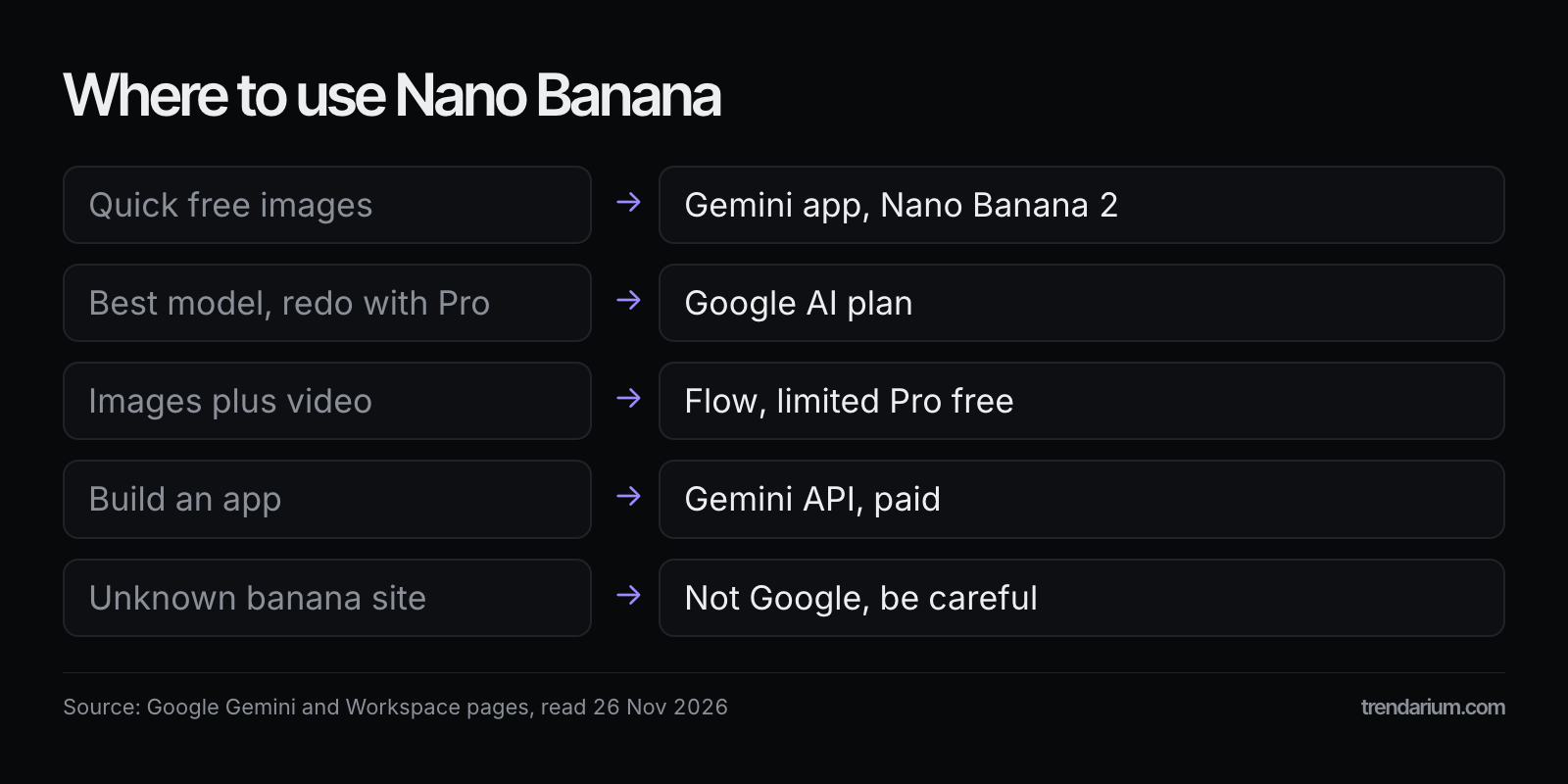
- Free, casual use: Nano Banana 2 in the Gemini app. It is the free model [4].
- Best everyday quality on a plan: Nano Banana 2.1, labelled the most advanced model on Google’s image page [4].
- Studio-level control: Nano Banana Pro. Google describes it as a professional design engine with studio-quality 4K output. In the Gemini app, Pro, Plus and Ultra users can use Redo with Pro on a finished image [3][4][12].
- Cheap bulk work through the API: 2.1 or 2 Lite at $0.0336 per 1K image, or half that in batch [1].
Google publishes no benchmark that ranks these models, so this list follows Google’s own descriptions and prices.
Where to use it free
| Where | Free? | What Google says | Source |
|---|---|---|---|
| Gemini app (gemini.google) | Yes, for Nano Banana 2 | Nano Banana 2 is marked “Free”; 2.1 is “with a Google AI plan”; “Redo with Pro” needs Pro, Plus or Ultra | [4] |
| Gemini app, limits | Limited | A daily Nano Banana 2 quota exists; the help page gives no number | [5] |
| Google Flow | Limited Nano Banana Pro | Free plan “access to Flow, including limited Nano Banana Pro” | [8] |
| Google Docs, Slides, Vids, Pics | Promotional, Slides only | Personal accounts: “promotional” limits, no fixed number; Workspace work accounts: 30 uses a month typical | [7] |
| Google AI Studio and Gemini API | No | Image models are not on the API free tier | [1] |
Read on 26 November 2026.
How to use it in the Gemini app: open the tools menu and choose “Create images”, then type a prompt or upload an image to edit [4].
Third-party sites quote daily numbers such as 2 or 20 free images. Google’s pages give none, and Google says limits apply and change [4][5][6]. We do not repeat unofficial numbers.
Price per image
These are Gemini API prices in USD on the standard paid tier, from Google’s pricing page [1]. Batch prices are shown where the page lists them.
| Model | 0.5K | 1K | 2K | 4K | Batch, 1K |
|---|---|---|---|---|---|
| Nano Banana 2.1 | not listed | $0.0336 | $0.0504 | $0.113 | $0.0168 |
| Nano Banana 2 | $0.045 | $0.067 | $0.101 | $0.151 | not listed |
| Nano Banana 2 Lite | not listed | $0.0336 | not listed | not listed | $0.0168 |
| Nano Banana Pro | not listed | $0.134 | $0.134 | $0.24 | not listed |
| Nano Banana (original) | not listed | $0.039 | not listed | not listed | $0.0195 |
Prices read on 26 November 2026 from Google’s Gemini API pricing page. Taxes may apply. Google may change prices.
Per million tokens, standard tier, image output: $30 for 2.1, 2 Lite and the original; $60 for Nano Banana 2; $120 for Pro [1]. Google’s changelog says 2.1 reached general availability on 6 October 2026, and its image output price is half that of Nano Banana 2 [1][2].
In the Gemini app you pay with a Google AI plan rather than per image. Plans and limits are in our Gemini guide: Google AI Plus is $4.99 a month, AI Pro $19.99 and AI Ultra $99.99 or $199.99 [8].
Unofficial sites
Search results for “nano banana” are crowded, and they differ by place and day. In the searches we recorded on 26 November 2026, the first page of a US search showed nanobanana.io and nanobanana.im. A Polish search for “nano banana za darmo” showed nano-banana.ai, nanobananatool.com, seevido.com and nanobanana.org. None of them appears on a Google page we read.
What we can say from Google’s pages:
- Google’s own pages send you to the Gemini app, Google AI Studio, the Gemini API, Google Pics and deepmind.google [3][4].
- Official domains we read: gemini.google, aistudio.google.com, deepmind.google, support.google.com and blog.google.
- A site with a banana logo, a paid plan and a prompt box is not proof of a link to Google.
A short checklist before you use a site: check who owns it, check that it says it is unofficial, do not upload photos of people you cannot share, and do not enter card details you have not checked. We did not investigate any of these sites, and we do not say they are scams. Some resell access to Google’s API legitimately. The point is that they are not Google.
How to start
- Open gemini.google.com and sign in with a Google account.
- Open the tools menu and choose “Create images” [4].
- Type a prompt, or upload an image and say what to change.
- Redo with Nano Banana Pro if you have a Google AI plan: set the model to Pro and ask to redo the image [5].
- For developers: use Google AI Studio or the Gemini API with a model ID from the table, on a paid tier [1].
What we checked
On 26 November 2026 we read the Gemini API pricing page, models page and changelog, the DeepMind model page, the Gemini image page, three Gemini help pages, a Workspace usage page, the Google AI plans pages and the Flow credits page.
The Flow credits page does not mention Nano Banana and lists no credit cost for it [10]. The Gemini help pages give no per-day image numbers [5][6]. This page makes no claim about image quality and has no side-by-side comparison with Midjourney. For that tool’s plans see our Midjourney guide. For ChatGPT’s image features see ChatGPT.
Compared
| Gemini app | Flow | Google AI Studio and API | |
|---|---|---|---|
| For | Casual images and edits | Image and video projects | Apps and bulk work |
| Free | Nano Banana 2, limited | Limited Nano Banana Pro on the free plan | No image models on free tier |
| Paid | Google AI plan | Google AI plan credits | Per image, table above |
| Link | Gemini hub | Google Flow hub | Google AI Studio hub |
Problems and fixes
| Symptom | Cause | Fix | Source |
|---|---|---|---|
| “Redo with Pro” is unavailable | You reached the daily Nano Banana 2 quota, or have no Google AI plan | Wait for the reset or upgrade | [5] |
| Cannot edit an image | Image editing needs age 18 or over | Use an adult account; generating needs 13 or the local minimum | [5] |
| Image models missing in the API free tier | Google does not offer them there | Enable billing | [1] |
Model gemini-3.1-flash-image flagged deprecated |
Changelog notice of 6 Oct 2026, no shutdown date | Move to gemini-nano-banana-2.1 |
[2] |
Model gemini-2.5-flash-image stops working in 2027 |
Shutdown on 15 March 2027 | Move to Gemini 3.1 Flash-Lite Image, as Google recommends | [1] |
| Workspace account hits a limit | Typical 30 uses a month, admin set | Ask the admin or use the AI Expanded Access add-on | [7] |
| Cannot find Nano Banana in school account | School accounts may be restricted | Check admin settings | [5] |
What changed
- 26 Nov 2026: page published. Names, prices and limits read on this date.
- 6 Oct 2026: Nano Banana 2.1 became generally available on the API, and
gemini-3.1-flash-imagewas marked deprecated, per Google’s changelog [2]. - 30 Jun 2026: Nano Banana 2 Lite reached general availability [2].
- 28 May 2026: Nano Banana Pro (
gemini-3-pro-image) reached general availability [2]. - 15 Mar 2027 (scheduled): original Nano Banana model shuts down [1].
FAQ
What is Nano Banana?
Nano Banana is the name Google uses for its Gemini image generation and editing models. Google DeepMind lists Nano Banana Pro, Nano Banana 2 and Nano Banana 2 Lite on its model page. Google’s developer pages also list Nano Banana 2.1 and the original Nano Banana. Read 26 November 2026. [1][3]
Is Nano Banana free?
Partly. Google’s Gemini page marks Nano Banana 2 as free in the Gemini app and Nano Banana 2.1 as available with a Google AI plan. Image models are not on the Gemini API free tier. Google gives no daily image number on the pages we read, and says limits apply. Read 26 November 2026. [1][4][5]
How much does Nano Banana cost per image?
On the Gemini API’s standard tier, Google lists $0.0336 for a 1K image on Nano Banana 2.1 and 2 Lite, $0.067 on Nano Banana 2, $0.134 on Nano Banana Pro and $0.039 on the original. Batch prices are half for models that list batch. Read 26 November 2026. [1]
What is the difference between Nano Banana 2 and Nano Banana Pro?
Per Google DeepMind, Nano Banana Pro offers studio-quality precision and control, while Nano Banana 2 gives pro-level results at Flash speed. Pro is built on Gemini 3 Pro Image and Nano Banana 2 on Gemini 3.1 Flash Image. Pro costs about twice as much per 1K image through the API. Google publishes no quality benchmark between them. [1][3]
Are Gemini and Nano Banana the same thing?
No. Gemini is Google’s AI assistant. Nano Banana is the name of its image generation and editing models. In the Gemini app you choose Create images from the tools menu, and Gemini uses a Nano Banana model to make or edit the picture. Google AI plans raise the limits and unlock Redo with Pro. [4][5]
Is nanobanana.io the official Nano Banana site?
None of the Google pages we read link to nanobanana.io, nanobanana.im, nano-banana.ai or nanobananatool.com. Google’s pages point to the Gemini app, Google AI Studio, the Gemini API and deepmind.google. Treat other sites as unofficial and do not upload private photos or pay without checking who runs them. [3][4]
Can I run Nano Banana locally?
We found no download of Nano Banana models on the Google pages we read. Google offers them through the Gemini app, Google AI Studio, the Gemini API and Google Pics. Anything sold as a local Nano Banana install is not from Google. [3]
Does Nano Banana add a watermark?
Yes. Google says the Gemini app adds an invisible SynthID watermark and a visible watermark to images. You can upload an image to the Gemini app and ask whether Google AI made it. Google’s page says this check covers images, audio and video. Read 26 November 2026. [4]
Is Nano Banana available in Poland?
Yes, in the Gemini app. Poland and Polish are on Google’s supported lists for Gemini apps, and Google says image generation works in every country and language where the Gemini app does, with limits. Google runs a Polish image page. Image editing needs age 18 or over. Read 26 November 2026. [4][5][11][13]
Disclosure: Trendarium uses AI assistants when drafting pages.
Sources
- Google, Gemini API pricing, https://aistudio.google.com/docs/pricing, read 26 Nov 2026
- Google, Gemini API changelog, https://aistudio.google.com/docs/changelog, read 26 Nov 2026
- Google DeepMind, Gemini Image (Nano Banana), https://deepmind.google/models/gemini-image/, read 26 Nov 2026
- Google Gemini, Image generation overview, https://gemini.google/us/overview/image-generation/, read 26 Nov 2026
- Gemini Apps Help, Create images with Gemini, https://support.google.com/gemini/answer/14286560, read 26 Nov 2026
- Gemini Apps Help, Gemini Apps limits and upgrades for Google AI subscribers, https://support.google.com/gemini/answer/16275805, read 26 Nov 2026
- Google Workspace Knowledge, Usage limits in Nano Banana (updated 10 Nov 2026), https://knowledge.workspace.google.com/ai/usage-limits-nano-banana, read 26 Nov 2026
- Google, Gemini subscriptions (US page), https://gemini.google/subscriptions/?hl=en, read 26 Nov 2026
- Google One, Google AI plans (Dutch page), https://one.google.com/about/google-ai-plans/, read 26 Nov 2026
- Google Flow Help, Manage your Google Flow credits, https://support.google.com/flow/answer/16526234, read 26 Nov 2026
- Gemini Apps Help, Supported languages and countries, https://support.google.com/gemini/answer/13575153, read 26 Nov 2026
- Google, Gemini API models, https://aistudio.google.com/docs/models, read 26 Nov 2026
- Google Gemini, Image generation overview, Polish page, https://gemini.google/pl/overview/image-generation/?hl=pl-PL, read 26 Nov 2026
Read next
- Gemini: plans, prices and limits: the Google AI plans that unlock Nano Banana 2.1 and Pro.
- Google AI Studio: the developer route and API models.
- Google Flow: Google’s video tool, which also uses Nano Banana.
- Midjourney: the main rival for AI images.
- ChatGPT: OpenAI’s assistant, with its own image features.
Written by
Mike
Mike is the founder and editor of Trendarium. He writes about AI tools, games and consumer tech. Drafts are prepared with AI assistance; every price, date and claim is checked against the official source linked on the page, and each page shows when it was last updated.
Related hubs
Most read
- Nintendo Switch 2 games: key titles by genre, prices, scores and what is next
- GTA 6 Online: what Rockstar and Take-Two have said, and what is rumor
- Midjourney: plans, GPU hours, free trial status and image rights
- Nano Banana: model names, where it is free, price per image and unofficial sites
- PlayStation Plus: prices in the US and Poland, monthly games, and what happens if you cancel