Drafted with AI assistance. Every price, date and claim was checked against the linked sources on the date shown.
In short
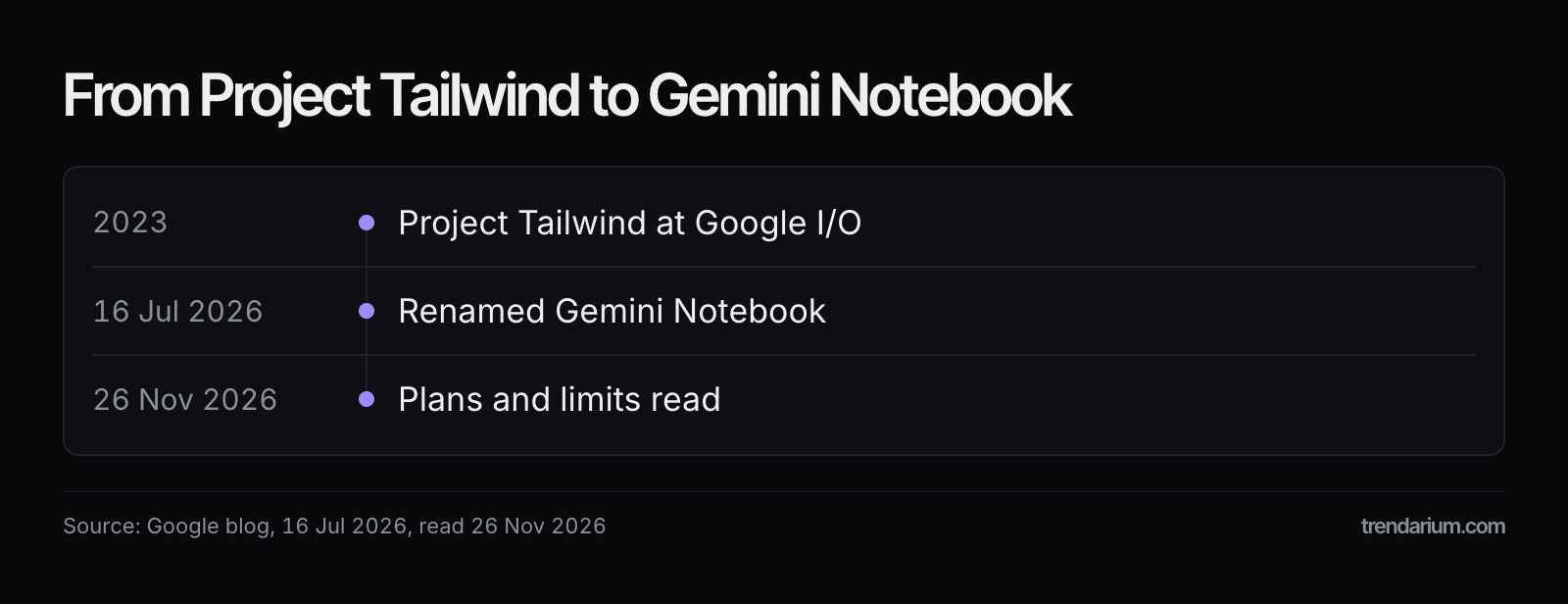
- Gemini Notebook, formerly NotebookLM, is Google’s AI research notebook. It launched as Project Tailwind at Google I/O 2023 and was renamed on 16 July 2026 [1].
- It is free with a Google account: 100 notebooks and 50 sources per notebook. Plus, Pro and Ultra plans raise the caps [2].
- Plans cost $4.99, $19.99 and from $99.99 a month in the US, and 23.99 zł, 97.99 zł and from 469.99 zł in Poland [6][7].
- Audio Overviews work in Polish [4].
Read 26 November 2026.
What it is, and why the name changed
Gemini Notebook is a Google tool where you collect sources for one project, such as PDFs, notes and web pages, and ask questions about them. Google’s help page defines a notebook as a collection of sources for a specific project. Each notebook is separate, so the tool cannot search across several notebooks at once [5].
Google’s blog says it launched as Project Tailwind at Google I/O 2023 and was renamed NotebookLM later. On 16 July 2026 Google announced a second rename, to Gemini Notebook. It stays a standalone product. Notebooks can now be created and opened in the Gemini app, with syncing between the two, and each notebook gets a secure cloud computer that can write and run code to analyze your data. Google also says notebooks are coming to AI Mode in Search, with no date given [1]. For AI Mode itself, see our Google AI Mode guide.
Rollout was staged. The code feature was available to Google AI Ultra users and some Workspace customers on the announcement day, with all Pro users on the web to follow “over the coming weeks” [1]. The page title of notebook.google now reads Gemini Notebook [8], while search results still use both names. This page covers both. The chat assistant around it is Gemini.
Plans and limits
The limits page ties caps to your Google AI plan. Google marks the numbers as subject to change [2].
| Plan | Price (US) | Price (Poland) | Notebooks per user | Sources per notebook | Notes per notebook | Source |
|---|---|---|---|---|---|---|
| No AI plan (free) | $0 | 0 zł | 100 | 50 | 500 | [2][6] |
| Google AI Plus | $4.99 a month | 23.99 zł | 200 | 100 | 500 | [2][6][7] |
| Google AI Pro | $19.99 a month | 97.99 zł | 500 | 300 | 500 | [2][6][7] |
| Google AI Ultra, 20 TB storage | $99.99 a month (5x tier), reported | 469.99 zł | 500 | 500 | 600 | [2][6][7][12] |
| Google AI Ultra, 30 TB storage | $199.99 a month (20x tier), reported | 979.99 zł | 500 | 600 | 600 | [2][6][7][12] |
Prices read on 26 November 2026 from Google’s plans pages (US and Polish versions). Taxes may apply. The limits page splits Ultra by storage, 20 TB and 30 TB. The plans page splits Ultra by usage, 5x and 20x Pro, and says storage starts at 20 TB [6]. No Google page we read lines the two splits up. A 9to5Google report of 25 May 2026 pairs the $200 plan with 20x usage and 30 TB and gives no storage figure for the $100 plan [12]. The $99.99 and 20 TB match is our inference from that report, which is why the table shows the mapping as reported, not confirmed. Check your account before paying.
Enterprise customers get “Gemini Notebook for Enterprise” through Google Cloud, with 5x or more notebook artifacts, including Audio Overviews, Video Overviews and Reports [2].
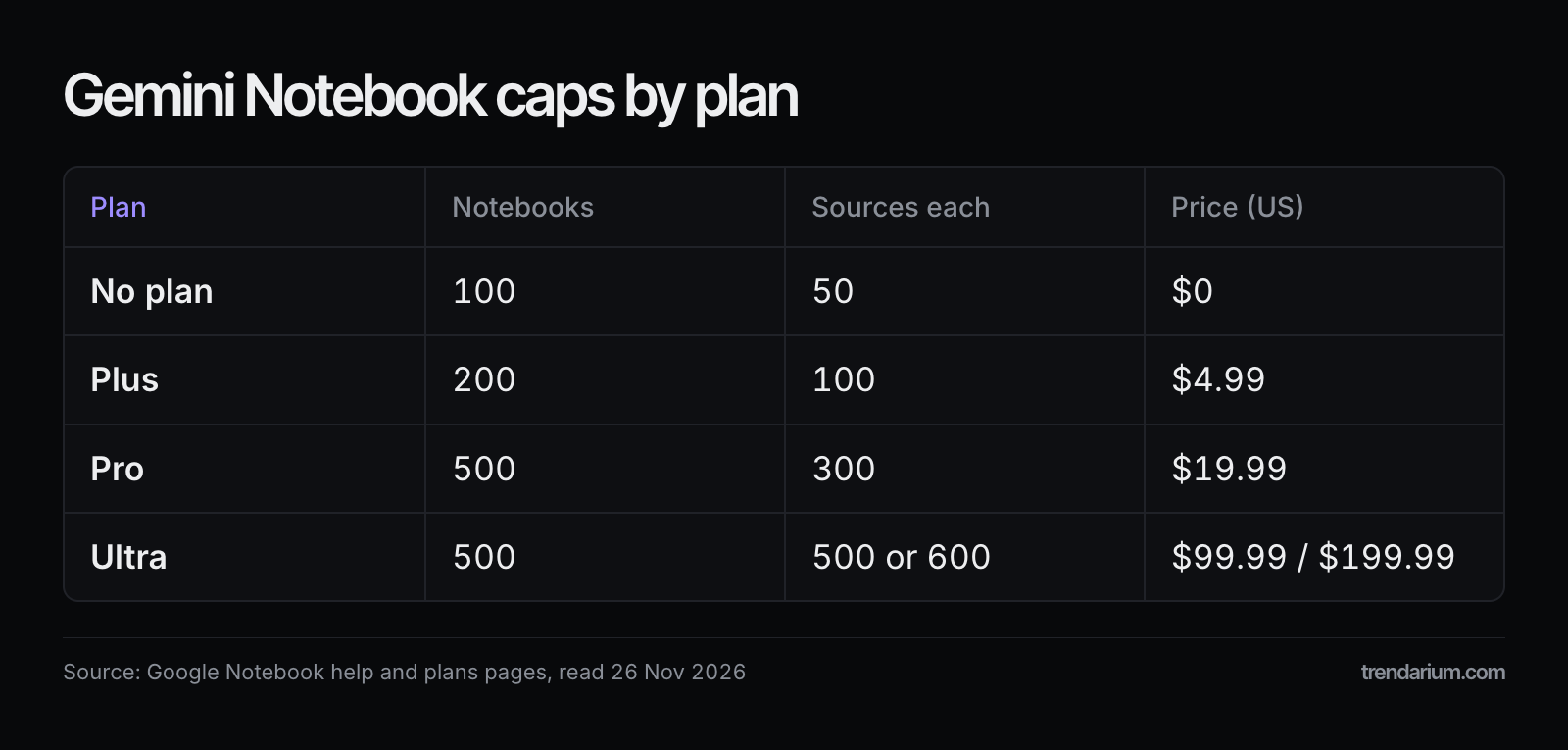
Other limits are relative, not counted. Google’s usage page says your quota refreshes every 5 hours up to a weekly limit, depends on prompt complexity, model, chat length and features, and scales from standard with Plus at 2x, Pro at 4x and Ultra at 5x or 20x Pro. It publishes no daily number of chat queries, Audio Overviews or Video Overviews [3]. Check Settings, then Usage, inside the app. Pro and Ultra can remove the watermark from generated outputs; Free and Plus cannot. A visible watermark is applied anyway if you live in India, South Korea or Vietnam [2]. Items the tool generates automatically when you add sources do not count toward limits [2].
What you can do with it
Per Google, you collect sources in a notebook, ask questions in chat and get answers based on those sources. You can also generate an Audio Overview, a spoken summary of the sources, and the enterprise edition lists Video Overviews and Reports as notebook artifacts [2][5]. Google’s rename post adds code-based data analysis and notebooks inside the Gemini app [1]. Typical uses Google names for students are notes turned into audio and video summaries [1]. We make no claim about answer quality.
Which files you can add
Google’s help page lists these source types: PDF, Word (.docx), text, Markdown, CSV and PowerPoint files, Google Docs, Slides and Sheets, images (JPG, PNG, WebP, HEIC), ePub, web URLs, public YouTube videos, pasted text, eligible Google Play Books and audio files such as MP3 and WAV [11]. Limits on that page: up to 500,000 words per source, up to 200 MB per uploaded file, up to 100 slides per Google Slides source, and up to 100k tokens for a Google Sheets source. YouTube has no video length limit unless the caption file passes 500,000 words [11].
How to start
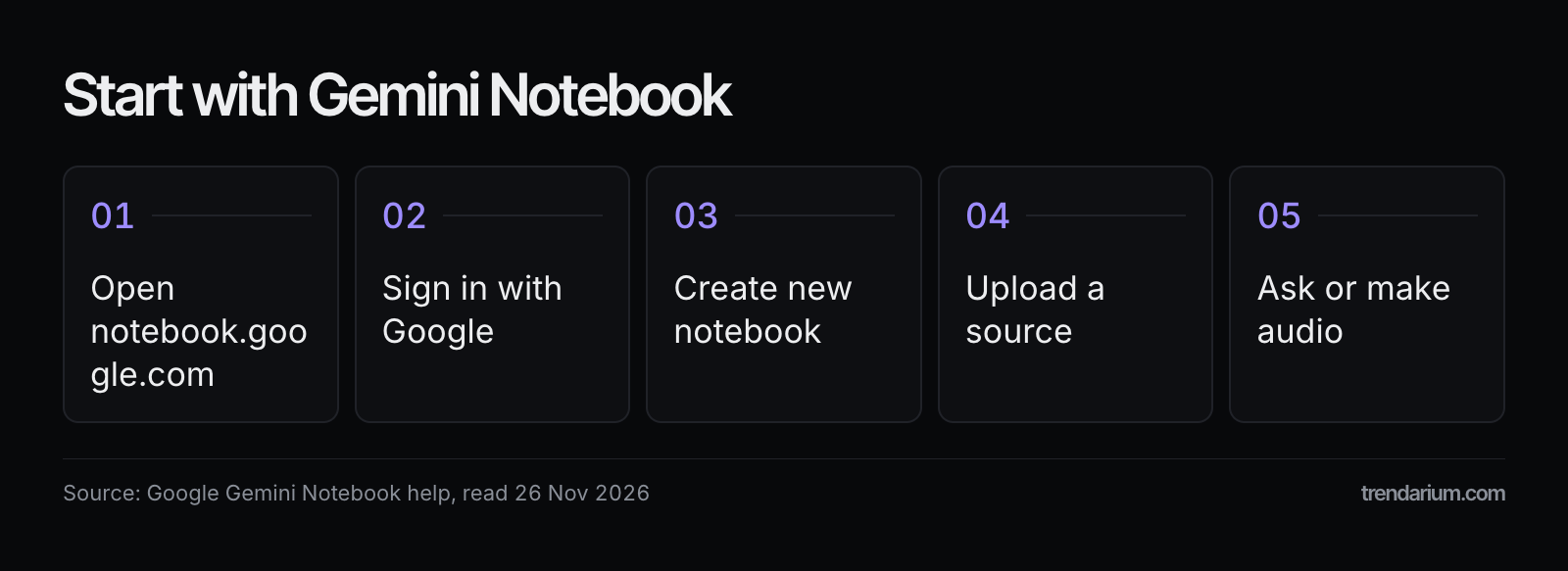
- Open notebook.google.com and sign in with a Google account [5].
- Select Create new notebook.
- Select Upload a source and add your files or other sources [5].
- Ask questions in chat, or generate an Audio Overview from the notebook [4][5].
- Check Settings, then Usage, to see how much of your limit you have used [3].
Languages and availability
Audio Overviews: Google’s help page says you can generate them in 80+ languages. Polish is on the list of 80. You need edit access to the notebook, and the page states no plan requirement. Google also lets you pick Shorter, Default or Longer length, and marks that choice English only. The interactive mode is also English only for now [4]. We found no Google page on the language of chat answers.
Countries and age: Google’s FAQ tells you to verify your age in your Google Account and to check that your country is among the 180+ regions where the Gemini app is available [9]. It names no country list for Gemini Notebook itself. Poland is on the Gemini app’s list, covered in our Gemini hub.
Devices: the browser app is at notebook.google.com. Google’s FAQ describes an early mobile app with many core features, and Google’s help page says the mobile app may limit some features [5][9]. A Google Play listing named Gemini Notebook exists [10]. We found no official desktop app on the pages we read.
Sharing and privacy
In the share menu, a lock icon marks a private notebook, a shared icon marks one shared with specific people, and a globe marks a public one [9]. Google’s FAQ says “Your data will never be shared by Gemini Notebook” and links a data-protection article that we did not read. We found no Google page on sharing roles or on whether your content trains models, so we make no claim about either [9].
What we checked
On 26 November 2026 we read Google’s announcement of the rename, the plans and limits page, the usage-limits page, the Audio Overview page, the getting-started page, the add-sources page, the FAQ and the US and Polish plans pages. We opened notebook.google and the Google Play listing, but only their page titles were readable. Search results also showed a Google blog post on flashcards and quizzes dated 6 November 2025, which we did not open and do not cite. A 9to5Google report supports the Ultra mapping marked as reported.
Disclosure: Trendarium uses AI assistants when drafting pages.
Gemini Notebook compared
| Gemini Notebook | Gemini app | Google AI Studio | |
|---|---|---|---|
| What it does | Answers from sources you add, per notebook | General chat assistant | Developer workspace and API keys |
| Free level | Yes, with caps above | Yes, usage-limited | Yes, usage is free of charge |
| Needs a paid plan for more | Plus, Pro or Ultra | Plus, Pro or Ultra | API billing or a Google AI plan |
| Our page | this page | Gemini | Google AI Studio |
Gemini Notebook is not the same as asking a general chatbot a question. A notebook works from the sources you add. If you want a general assistant, see ChatGPT or Claude. We did not compare answer quality.
Problems and fixes
| Symptom | Cause | Fix | Source |
|---|---|---|---|
| Cannot add more sources or notebooks | Plan cap reached (for example 50 sources free) | Remove items or move to a higher plan | [2] |
| Audio Overview option missing | No edit access to the notebook | Ask the owner for edit access | [4] |
| Some feature missing on phone | Mobile app has limits | Use the web version | [5] |
| Usage runs out | Quota refreshes every 5 hours up to a weekly cap | Wait for the refresh or upgrade | [3] |
| Watermark on generated output | Plan below Pro, or you live in India, South Korea or Vietnam | Upgrade to Pro, except in those three countries | [2] |
What changed
- 26 Nov 2026: page published. Plans, limits and the rename were read on this date.
- 16 Jul 2026: Google announces NotebookLM is now Gemini Notebook, adds cloud computer for code, and notebooks in the Gemini app [1].
- 2023: product launched as Project Tailwind at Google I/O, per Google [1].
FAQ
Is NotebookLM free?
Yes. Google’s limits page lists Gemini Notebook, the new name of NotebookLM, for users without an AI plan, with a Gmail account. The free level allows 100 notebooks per user and 50 sources per notebook. Paid Google AI plans raise those numbers. Read 26 November 2026. [2]
Is NotebookLM the same as Gemini Notebook?
Yes. Google’s blog says NotebookLM is now called Gemini Notebook, announced on 16 July 2026. It remains a standalone research product, and notebooks can now also be created and opened inside the Gemini app. Many pages and searches still use the old name. [1]
How much does NotebookLM cost?
Nothing at the free level. Higher limits come with Google AI plans: Plus $4.99, Pro $19.99 and Ultra from $99.99 a month on Google’s US plans page, read 26 November 2026. In Poland the same plans cost 23.99 zł, 97.99 zł and from 469.99 zł a month. [6][7]
What are the NotebookLM limits?
Per Google’s limits page: 100 notebooks and 50 sources per notebook with no plan, 200 and 100 on Plus, 500 and 300 on Pro, 500 and 500 or 600 on Ultra. Google marks these as subject to change. Daily chat and audio numbers are not published. [2][3]
Does NotebookLM work in Polish?
Audio Overviews can be generated in Polish: Google’s help page lists it among 80+ supported languages. Google’s pages say nothing about the language of chat answers, and the Longer audio length is English only. Poland is not named for this product, so check the audio language list in the app. [4][9]
How do I log in to NotebookLM?
Open notebook.google.com and sign in with a Google account. Google’s help page says to select Create new notebook, then Upload a source. The page title of that address is now Gemini Notebook. Google also says you must verify your age in your Google Account. A mobile app exists, with some features limited. [5][8][9]
Is there a NotebookLM app for Mac or Windows?
We found no official Mac or Windows app on the Google pages we read. The product runs in the browser at notebook.google.com, and Google documents an early mobile app. A Google Play listing named Gemini Notebook exists. Read 26 November 2026. [5][9][10]
Who owns NotebookLM?
Google. Its blog says the product launched as Project Tailwind at Google I/O 2023 and now says more than 30 million people and 600,000 organizations use it. Its limits are tied to Google AI plans, so billing runs through Google, not through a separate company. [1]
Which files does NotebookLM support?
Google’s help page lists PDF, Word, text, Markdown, CSV and PowerPoint files, Google Docs, Slides and Sheets, images, EPUB, web links, public YouTube links, pasted text and audio such as MP3 and WAV. Uploads can be up to 200 MB and 500,000 words per source. [11]
Can I share a notebook, and is it private?
The share menu marks a notebook as private, shared with specific people, or public. Google says your data will never be shared by Gemini Notebook, and links a data-protection page we did not read. We found no page explaining sharing roles or model training, so we make no claim. [9]
Sources
- Google, NotebookLM is now Gemini Notebook, https://blog.google/innovation-and-ai/products/gemini-notebook/notebooklm-gemini-notebook/, read 26 Nov 2026
- Google Gemini Notebook Help, Plans and limits, https://support.google.com/notebooklm/answer/16213268, read 26 Nov 2026
- Google Gemini Notebook Help, Manage your Gemini Notebook usage limits, https://support.google.com/gemininotebook/answer/17670842, read 26 Nov 2026
- Google Gemini Notebook Help, Generate Audio Overview in Gemini Notebook, https://support.google.com/gemininotebook/answer/16212820, read 26 Nov 2026
- Google Gemini Notebook Help, Create a notebook in Gemini Notebook, https://support.google.com/gemininotebook/answer/16206563, read 26 Nov 2026
- Google, Gemini plans, US prices, https://gemini.google/subscriptions/?hl=en, read 26 Nov 2026
- Google, Plany Gemini, ceny w zł, https://gemini.google/pl/subscriptions/?hl=pl, read 26 Nov 2026
- Google, Gemini Notebook | AI Research Tool & Thinking Partner (notebook.google; only the page title was readable), https://notebook.google/, read 26 Nov 2026
- Google Gemini Notebook Help, Frequently asked questions, https://support.google.com/notebooklm/answer/16269187, read 26 Nov 2026
- Google Play, Gemini Notebook – Apps on Google Play (page title only), https://play.google.com/store/apps/details?id=com.google.android.apps.labs.language.tailwind&hl=en_US, read 26 Nov 2026
- Google Gemini Notebook Help, Add or discover new sources for your notebook, https://support.google.com/gemininotebook/answer/16215270, read 26 Nov 2026
- 9to5Google, Google One AI Ultra clarification (25 May 2026), https://9to5google.com/2026/05/25/google-one-ai-ultra-clarification/, read 26 Nov 2026
Read next
- Gemini: the Google AI assistant, its plans (Free, AI Plus, Pro, Ultra) and models.
- Google AI Studio: free developer workspace and API keys.
- Google AI Mode: the chat tab in Google Search, where notebooks are due to arrive.
- ChatGPT: plans and prices of OpenAI’s assistant.
- Claude: plans and prices of Anthropic’s assistant.
Most read
- Suno: plans, credits, song rights and the lawsuits
- Nintendo Switch 2 games: key titles by genre, prices, scores and what is next
- GTA 6 Online: what Rockstar and Take-Two have said, and what is rumor
- Midjourney: plans, GPU hours, free trial status and image rights
- Nano Banana: model names, where it is free, price per image and unofficial sites